
Author: Philip Kroos
Atlassian Consultant at XALT
If you are currently migrating from Server or Data Center to the Atlassian Cloud (or have already done so), you know the problem:
Your Jira and Confluence instance is running in the cloud, but some of your old power is missing. This refers to apps (formerly “plugins”) and in-house developments, that worked great on data centers, but in the cloud:
- are not available at all,
- only function to a limited extent or
- cannot be economically replicated 1:1.
So what happens in reality?
Teams fall back into manual workarounds back. Content is copied, pages are created by hand, processes are “patched up” with Excel and copy & paste. The cloud suddenly feels like a step backwards instead of an upgrade.
In this article, I'll show you how you can tackle exactly this point:
- Consistently rethinking legacy apps, instead of just saving them
- with Vibe coding (natural language + artificial intelligence + automation) to build new, cloud-native solutions
- and use a customer example to see how this 480 hours time saving, up to 300% more output in documentation and several thousand euros in cost savings per year.
Typical errors after cloud migration
App/plugin migration is underestimated
When upgrading to the Atlassian Cloud, many companies underestimate the importance of apps, macros and integrations developed in-house. This refers to all extensions for Jira and Confluence that were developed in-house and are not available in the Atlassian Marketplace. We therefore recommend treating self-developed apps or integrations as a separate step alongside the migration of Marketplace apps - precisely because not all plugins can be replaced 1:1.
Typical patterns:
- “We'll look at the plugin later” → later = often in practice never.
- The original developers of the solution are long gone.
- Nobody feels responsible for rethinking the function in the cloud.
Teams fall back into old, manual processes
After the cloud migration, teams then quickly fall back into old, manual processes and for many it feels like working in the cloud is a step backwards: “It used to be automatic, now everything is more complicated.”
The result:
- The acceptance of the Atlassian Cloud suffers. Instead of an upgrade, it looks like a downgrade.
- The planned ROI of the cloud upgrade is not realized: License costs increase, but there are no efficiency gains because central workflows (e.g. documentation, approvals, reports) are no longer automated.
Lack of expertise for automation
Atlassian now offers very solid options to connect Jira Automation with Confluence and, for example, trigger actions in Confluence from Jira.
In many organizations, however, there is a lack of internal expertise or it seems too technical at first glance.
Risk: Basic solutions instead of cloud standard
In order to compensate for the lack of apps, the following quickly arise:
- Scripts “under the table” (local, without governance)
- Semi-official REST API hacks
- Isolated solutions that are not properly documented.
In a nutshell: The pressure is high, but nobody wants “another app”. You need a solution that is native, scalable and manageable.
Vibe coding as a solution principle: rethink apps, don't rebuild them
Vibe coding means simplified:
You no longer build workflows in classic developer logic (code, complex configurations), but describe them in natural language and uses artificial intelligence (AI) and platform functions to generate rules, automations and integrations.
In the Atlassian environment, it looks like this:
- Atlassian Rovo becomes the AI layer on Jira & Confluence: Rovo knows your content, contexts and processes and helps you to design, test and refine workflows.
- Jira Automation and Confluence Automation provide the technical basis for triggering actions, sending webhooks and creating pages automatically.
The difference to the classic “app approach”:
- You are no longer dependent on a single app,
- You build on standard functions of the Atlassian Cloud auf,
- You can continuously expand your setup without having to have it developed every time.
The goal: Function instead of app. You define, which result you need (e.g. “A Confluence page with specific content for each story in the sprint”), and rebuild this result with native means supported by artificial intelligence.
5 steps from legacy app to vibe coding workflow
In the following, we outline a generic approach that we took in a customer project.
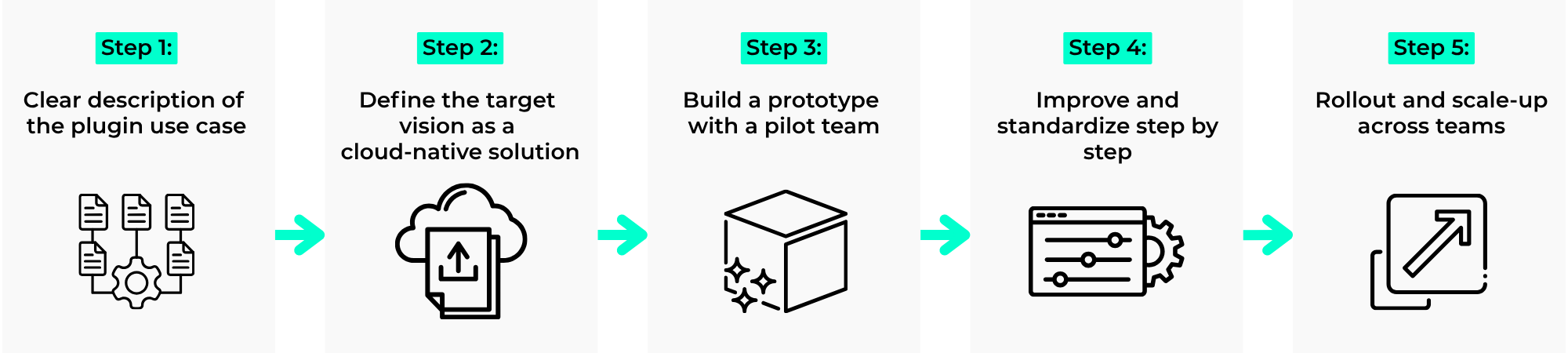
1. Clearly describe the use case of the legacy solution
Instead of “We need the app again”, you ask questions like:
- Which concrete task has the solution done?
- Which teams do use the solution? What results do they need at the end (e.g. PDF documentation, audit reports, sprint review documents)?
- Which fields / contents are really relevant (Summary, Description, Labels, Custom Fields, Status, Story Points, ...)?
In our customer example, the use case was as follows.
From Jira work items (primarily stories and bugs) Confluence pages should be automatically generated, structured according to sprints, with labels and metadata, so that they can later be exported as a PDF and used for audits.
2. Formulate target image as a cloud-native solution
This is where vibe coding comes into play. You formulate your target image in natural language, e.g:
Whenever a new sprint is started, Confluence pages are to be created automatically for all stories and bugs of this sprint for documentation purposes. The pages should hang under a sprint overview page, use a standardized template and be provided with specific and dynamically created labels.
From this you deduce:
- Trigger:Sprint start or issue status change
- Actions in Jira Automation:
- Identify issues in the sprint
- Option A (often the easiest): Create Confluence page directly via the native action (if available)
- Option B: Webhook / REST API call (if you need more control)
- Actions in Confluence Automation / via API:
- Create page from template
- Set up parent-child structure
- Set labels
Rovo supports the design of automation rules and payloads. JSON/payloads for webhooks and APIs must be tested and validated (e.g. authentication, required fields, API versions).
3. Build a prototype with a pilot team
Deliberately start small:
- Choose 1 to 2 teams that actively demand the use case aktiv einfordern.
- Implement an initial rule, e.g:
- Trigger: “Sprint started” in project X, on board Y
- Action: Create a page in Confluence for each issue in the sprint
- Keep template to a minimum:
- Title: {{issue.key}} - {{issue.summary}}
- Sections: Description, metadata (status, type, story points, labels), area for review notes
The goal is not perfection, but: “It works and saves time immediately”.
4. Iteratively refine and standardize
We know from a current customer project: The real added value comes from the second and third iteration.
Typical optimizations:
- Include additional fields in the payload (e.g. component, module, epic link).
- Standardize page templates (panels, macros, status displays).
- Improve error handling (e.g. if a page already exists or rights are missing).
- Create general templates that work for multiple projects.
With vibe coding, you formulate changes in natural language again (“Please add the ‚Component‘ field to the metadata block”); the AI helps you to extend the existing automation rules accordingly.
5. Rollout & scaling to other teams
If the use case works, then comes the scalable part:
- You build standardized Atlassian automation templates, which you only parameterize per team / project.
- You document setup, variables and troubleshooting in Confluence.
- You train team leads / admins to make small adjustments themselves (e.g. different parent page, additional labels).
This allows you to roll out a solution that you have built once with a pilot team to 5, 10 or 15 teams without having to start from scratch each time.
Result for our customer: 480 hours recovered per year
The initial situation of our customer:
On Data Center, there was an in-house development plugin that outputted Jira content as Confluence pages. There was no port in the cloud and the original developer was no longer with the company. As a result, teams recreated sprint and story pages manually after the migration. manuell For sprints with several dozen issues, this meant that several hours of additional work were required after each start of a new sprint
Our solution with vibe coding & native tools
- The use case was created as Cloud-native automation rethought:
- Jira Automation + Confluence Automation + Webhooks/REST (as required), no additional Marketplace plugin.
- The technical requirements were formulated in natural language and iteratively translated into rules and templates with the help of AI assistance (vibe coding approach).
The result:
- Time saving:Approx. 480 hours per year (approx. 60 working days), because sprint and story pages are created automatically
- Productivity increase:Up to 300% more output in documentation - teams spend their time on content instead of copy & paste.
- Cost savings:Several thousand euros per year, depending on the hourly rates of the roles involved.
- Operational safety:100% cloud-based, no dependency on an unsupported plugin or a single person.
Sample calculation for 480 hours/year:
- Assumptions: 8 teams, 24 sprints/year (2-week sprints), 2.5 h manual effort per sprint start and team (creating pages, structuring, labels/metadata, checks).
- Calculation: 8 × 24 × 2.5 h = 480 h/year.
- Note: actual value varies depending on the number of issues, templates and review requirements.
The decisive factor: The customer has no new “monster app” in the cloud, but has systematically expanded its cloud platform with on-board resources and AI.
Conclusion: Apps are just a means to an end - vibe coding gets you there
If there's one thing you take away from this article, it's this: Your Atlassian Cloud is not there to mimic your old server instance 1:1, it is the chance to rethink your workflows with vibe coding.
- Legacy apps are often a symptom of a lack of standard functionality in on-prem setups - in the cloud, many of these functions already exist as platform features.
- With Rovo, Jira Automation and Confluence Automation, you can handle most recurring tasks with ease automatically without additional apps. automatisieren.
- Vibe Coding helps you design these solutions faster and in a way that better aligns with business needs, rather than getting bogged down in technical details.
- And: The ROI of your cloud migration depends largely on whether you actually utilize this automation potential.
How XALT can help you specifically
If you are faced with the question of how to replace old apps/plugins or in-house developments in the Atlassian Cloud - especially around Jira-Confluence integration and documentation - you don't have to reinvent the wheel.
XALT supports you in this:
- Analyzing existing legacy solutions and rethinking them in the cloud instead of just replicating them 1:1.
- Cloud-native automations for Jira & Confluence - including a vibe coding approach with AI support.
- Enable your teams to further develop these solutions themselves (enablement & training).
Let's take a look together at which of your data center plugins you can replace or even improve in the Atlassian Cloud. You can speak directly to our Atlassian expert via the XALT contact page and describe your scenario.