

Author: Olga Beifus
Atlassian Consultant at XALT
You are probably familiar with this:
- In your team, there is an address like support@…, info@…, or complaints@…
- Several employees have access to the shared mailbox.
- Everyone “picks out” emails, replies directly from Outlook, and you hope that nothing gets lost.
In practice, it often looks like this: Emails sit unanswered, responsibilities are unclear, and no one has the full picture. And you, as a Department Head or Head of Operations, find it hard to prove how quickly your team responds, where things are getting stuck, or which topics are really keeping you busy.
In this article, we show you how to connect a shared mailbox to Jira Service Management (JSM) and transform your previously chaotic inbox handling into a clearly structured service process with responsibilities, SLAs, and reporting. SLAs (Service Level Agreements) are your binding guidelines regarding how quickly your team responds to requests and by when problems should be resolved. These agreements can apply to customers, but also internally between your department and other areas.
Goal: You get a practical overview without diving deep into technical details.
What goes wrong these days: Typical problems with shared mailboxes
Shared mailboxes are convenient – and that is exactly the problem. They simply grow along with you, without anyone consciously designing the process behind them. Typical symptoms that we see again and again with our customers:
- Lack of Transparency
No one sees at a glance who is handling which email. There is no clear overview of what is open, in progress, or completed. - Unclear Responsibilities
Employees “pick out” emails. Some topics sit untouched, others are answered twice. In the worst case, no one feels responsible. - No Status Overview
Neither the sender nor the team knows the current status of a request. “Has anyone replied to that yet?” is the standard question in the team chat. - Lack of Traceability
Finding an older request or evaluating processing times is very time-consuming in classic email inboxes – especially when multiple people are working on them. Studies show that email overload can significantly lower productivity and well-being. - No Automation
Reminders, escalations, SLA monitoring, customer satisfaction – all of this must be done by hand; in the worst case, it is dropped completely. In many organizations, important service requests thus end up in a “black hole”.
Especially when your department supports customers, partners, or internal stakeholders via a shared mailbox, a small convenience feature quickly becomes an operational risk.
The risk for your business
Unclear processes and a lack of transparency lead to three key risks:
- Low customer satisfaction due to delayed or unanswered requests, with potential loss of reputation and revenue.
- Inefficient use of resources due to increased manual effort and lack of process optimization.
- SLA and compliance violations due to insufficient traceability and delayed processing.
“According to Forrester, companies lose up to 25% of their efficiency due to fragmented systems and silos. Studies also show that employees spend up to two hours a day searching for information. Time that could be used more productively.”
For you as a lead, this means: You lose control over key KPIs such as throughput times, adherence to response times, and team workload, and it is difficult to provide reliable reports to executive management or the board.
Key figures affected:
- Processing times
- First response time
- Number of open or overdue transactions
- SLA compliance rate
- Workload per employee
Our solution: Bring the shared mailbox into the JSM ticket system
With Jira Service Management (JSM), you can connect your shared mailbox directly. Every incoming email is automatically converted into a ticket. This creates a structured workflow that enables transparency, traceability, and automation.
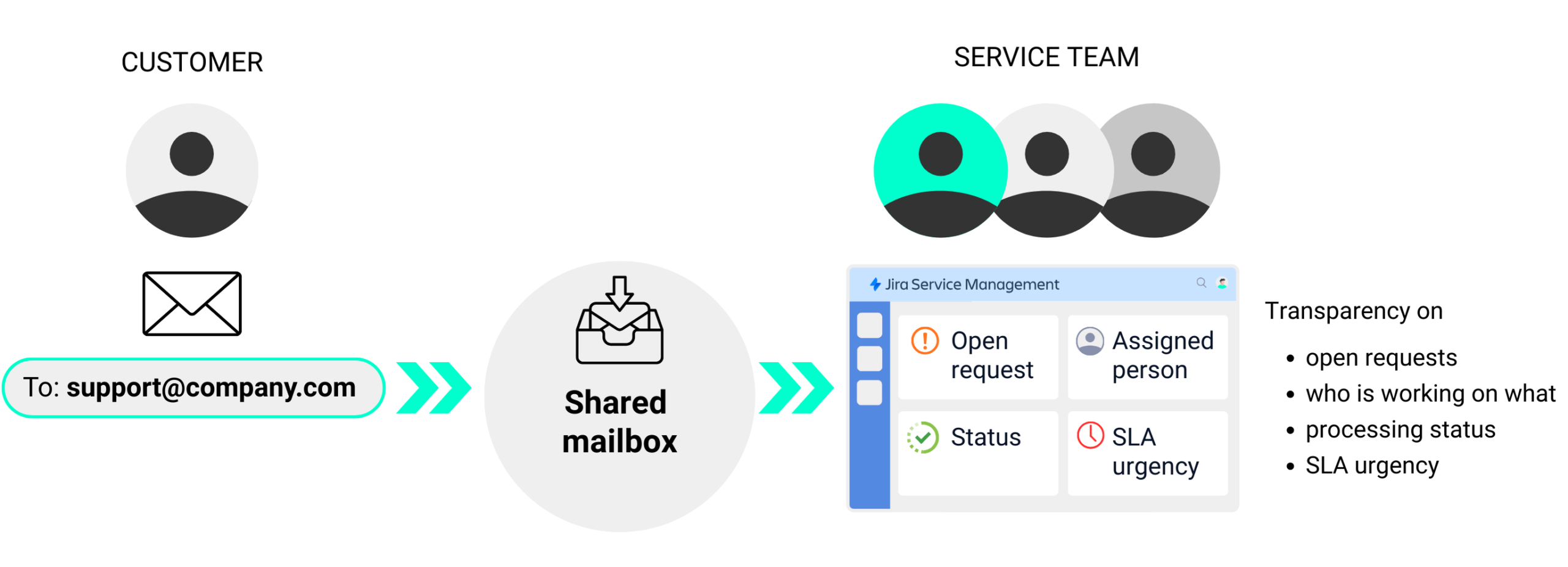
For senders, almost nothing changes: they continue to write to the same email address. In the background, however, something completely different happens:
- Every email to your shared mailbox automatically generates a ticket in JSM.
- The sender becomes the reporter, CC addresses become participants in the request.
- Your team no longer works in the email inbox, but in so-called queues in JSM.
- A configured workflow maps your process: e.g., New → In Progress → Waiting for Customer → Done.
- SLAs, reminders, escalations, and reporting run via JSM, no longer based on gut feeling.
This transforms a disorganized shared mailbox into a structured service solution.
If you are already using JSM for other use cases (e.g., IT support, internal service requests in HR or Finance), you can cleverly expand your existing environment.
What really excites me about our solution: All information, comments, and status changes are centrally visible within the ticket. This saves our clients endless coordination and follow-ups. Thanks to automation, such as reminders and SLA settings, the system effectively “thinks along” with you and ensures that no request gets left behind.
Olga Beifus, Atlassian Consultant at XALT
This is how the shared mailbox becomes a transparent and scalable service process
You usually need three roles for the implementation:
- Your department defines what the process should look like (responsibilities, SLAs, escalations).
- IT or Atlassian Admin sets up the JSM project, the email channel, and automations.
- Email/Microsoft Admin adjusts the shared mailbox.
A possible standard procedure would look like this:
- Email arrives in the shared mailbox
Example:complaint@organization.comorservice@administration.com. - Automatic ticket creation in JSM
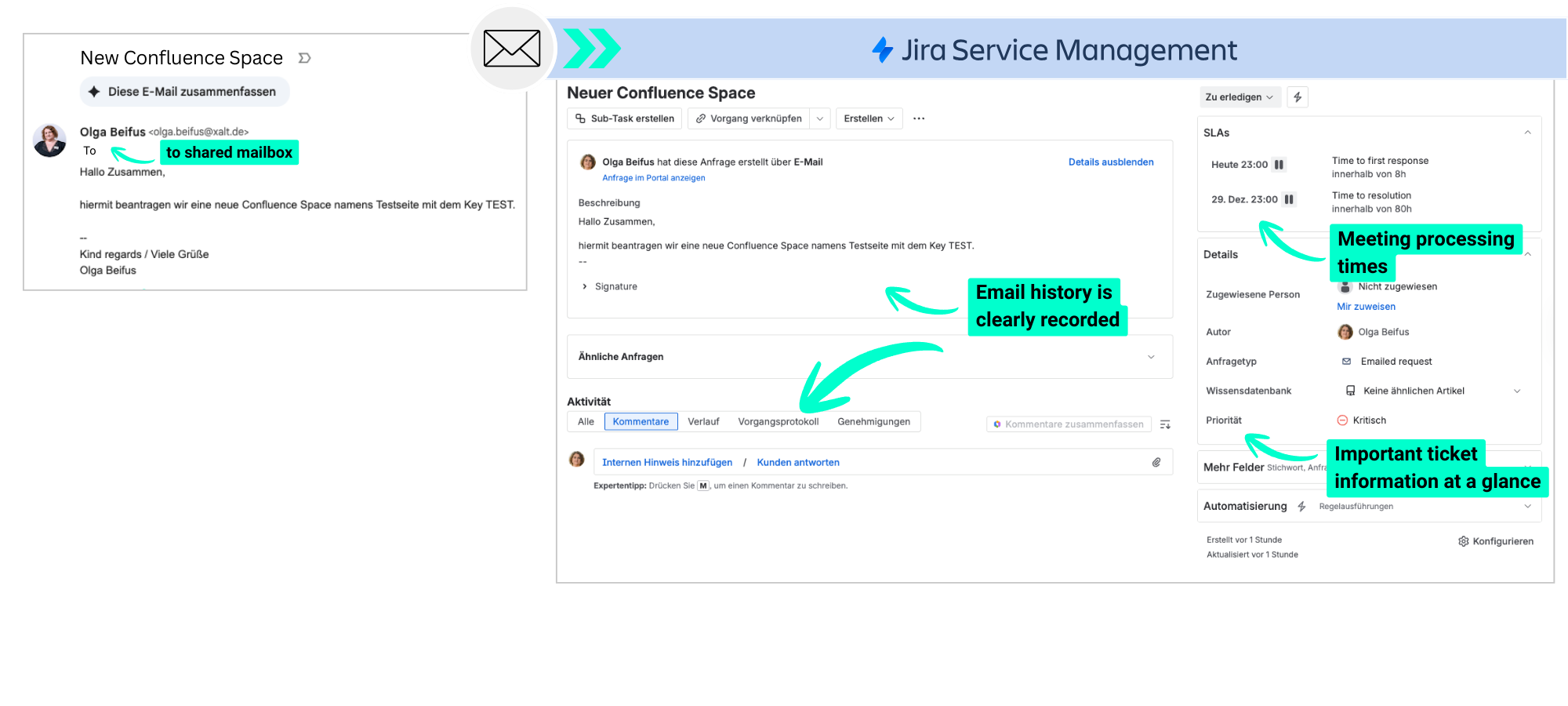
- JSM converts the e-mail into a ticket (From = Reporter, CC = request participant, subject becomes ticketSummary, e-mail content for Description).
- Processing in a team
- All employees who previously worked in the mailbox are now Agents in JSM.
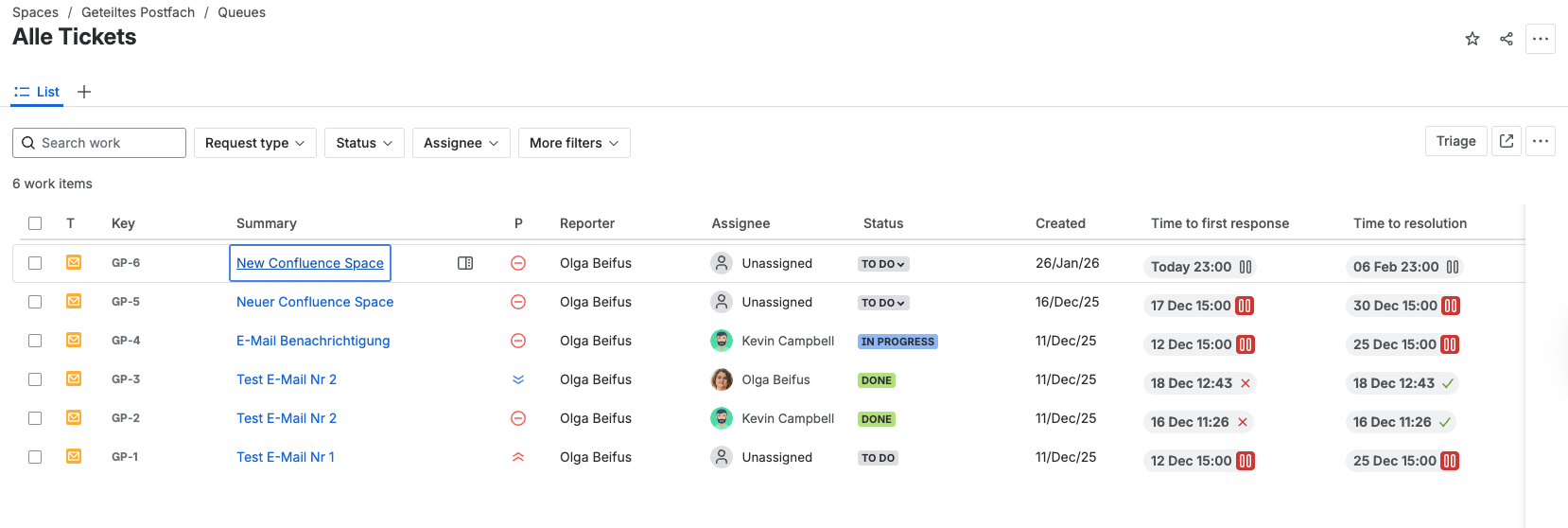
- Instead of „I'll take this mail“, there is a board or a queue with all open tickets and a clear status, e.g. Open, In process, Waiting for customer, Closed
- Communication from one channel
- Answers to the customer are written directly in the ticket and internal queries are recorded as internal comments If a reply from the customer is returned by e-mail, JSM recognizes this and automatically attaches this reply to the same ticket.
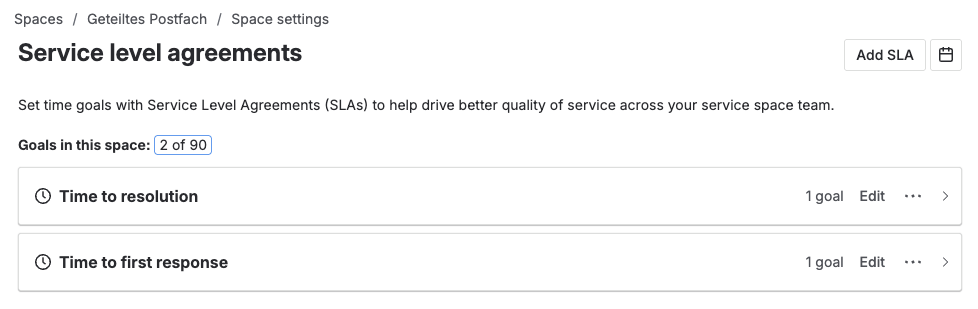
- SLAs, reminders & automations
- Tickets that have been in the „Open“ status for too long are automatically marked or reported to the responsible agents by e-mail.
- SLAs can define e.g. response time and resolution time
- Automations take over routine tasks, e.g:
- If a ticket is set to „Waiting for customer“ and the customer responds, the status automatically jumps back to „In process“.
- If certain keywords such as „complaint“ are in the subject line, a different workflow is selected.
What your team gets out of it
Why this is important for you: An unburdened, well-informed team works faster, makes fewer mistakes, and ensures satisfied customers. This is directly reflected in your metrics. For your team handling the requests, daily life changes quite fundamentally – and positively:
- Full transparency:
Visible at a glance: Which requests are open? Who is working on what? What is waiting for customer feedback? - Vacation and sick leave coverage becomes simple:
Instead of tediously searching through someone else's inbox, a glance at a colleague's tickets is enough, e.g., via predefined filters or, optionally, via an AI-powered query. - Better prioritization
Sorting e.g. by SLA urgency, due dates, status, customer/sender - Measurability & quality
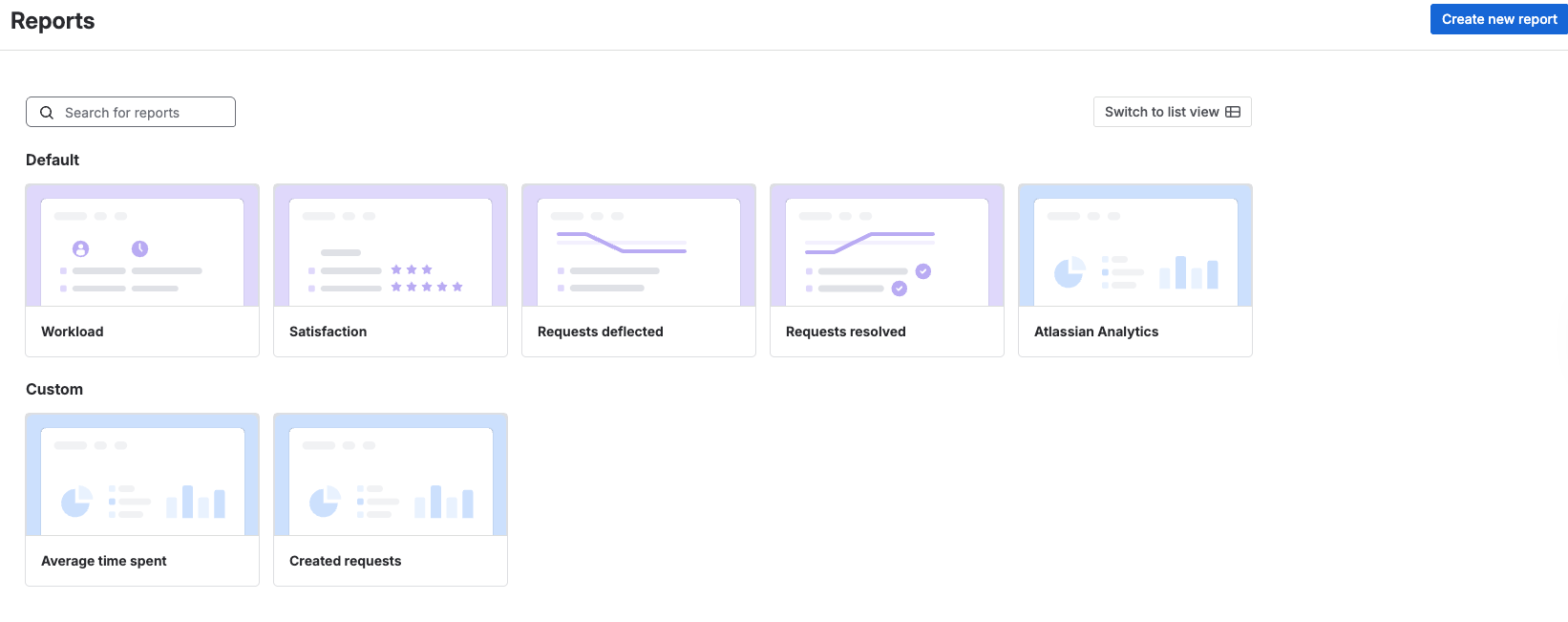
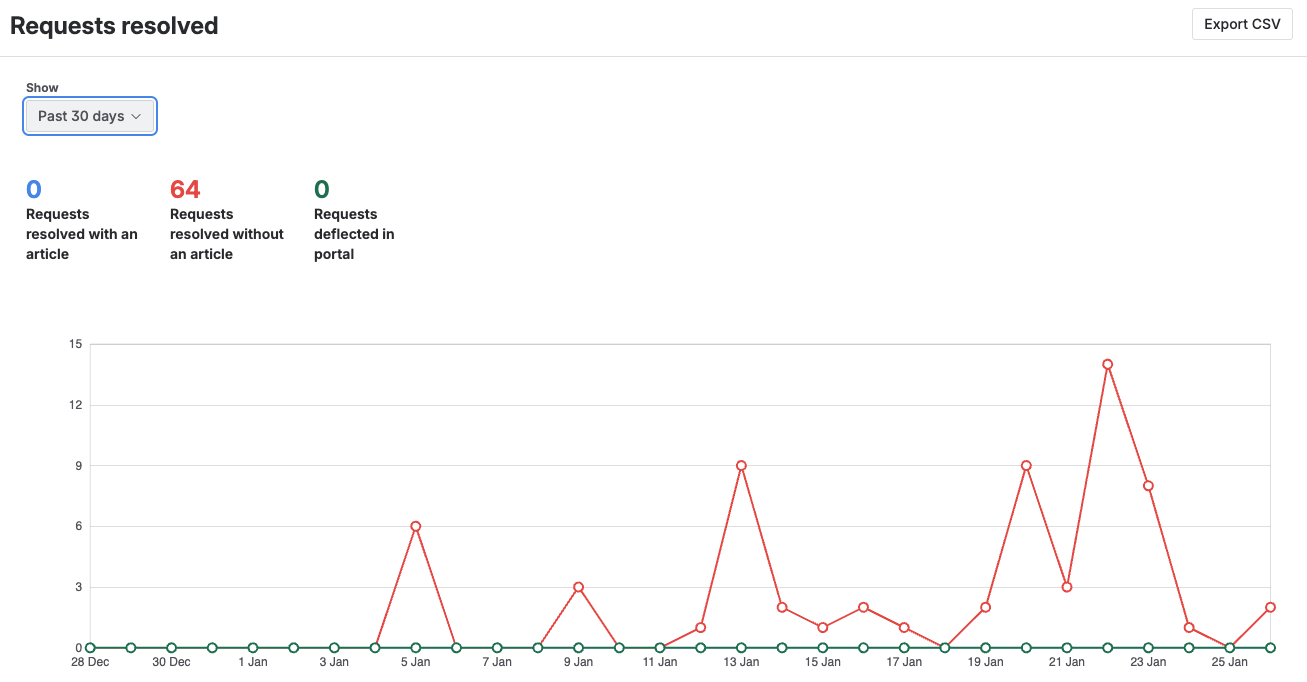
Reports and dashboards can be used to evaluate such things as How many requests come in? How quickly do we respond? How often are SLAs breached? How satisfied were customers with the processing?
What customers and employees notice
For customers, almost nothing needs to change, if you don't want it to.
- You continue to send e-mails to the known address.
- You will continue to receive e-mails in response.
- Optionally, you can give them more transparency, e.g:
- Status updates („Your request is being processed“),
- clear references (ticket numbers),
- and possibly even access to a portal where they can see all their requests.
The big difference happens in the background in the service team.
From a stand-alone solution to a cross-departmental service platform
For you as a department or operations manager, the decisive factor is that this solution is not a one-off project for a single mailbox, but a blueprint.
- You can roll them out to other departments, e.g. HR, Facility Management, Marketing & Communication.
- You reduce tool proliferation and shadow processes (Excel lists, private to-do tools).
- You create a central platform on which processes, tickets and key figures converge across departments.
This allows you to build up a standardized service management system step by step instead of chasing after five different isolated solutions.
Conclusion: Away from email chaos, towards controllable service processes
- Shared mailboxes are convenient for small volumes and teams, but not scalable: Transparency, responsibilities, traceability, and reporting are missing.
- With Jira Service Management, you can transform a shared mailbox into a clearly defined service channel without forcing your customers to use new portals.
- The keys are a deliberately designed workflow, cleanly configured email channels, queues for agents, as well as SLAs and reporting for you as a manager.
- Once established, an annoying „incidental mailbox“ becomes a measurable, automatable service process that can be rolled out to other departments - from marketing to HR to board offices.
This turns a selective improvement for a single shared mailbox into a strategic step towards professional service management across departmental boundaries.
You gain more transparency, better controllability and a clear basis for future growth.
Would you like to introduce the solution for your shared mailbox?
If you are currently responsible for one or more shared mailboxes and have the feeling that important requests are "hiding" there, now is the right time to take the next step.
Talk to us about your JSM implementation
Together we analyze your existing shared mailboxes (support@, info@, beschwerde@ & Co.) and evaluate them,
- where risks and blind spots lie today
- which KPIs you can quickly visualize with JSM
- and what a step-by-step introduction in your department might look like