
Author: Marcel Wänke
Senior Atlassian AI Consultant at XALT
Atlassian is consistently expanding AI experiences such as Rovo. For AI to really help in everyday life, it needs context - and context comes from patterns in usage. This is precisely why Atlassian is updating its data usage guidelines and introducing new, centralized settings for data contribution. ein.
Important for you as an Atlassian Admin: This is not a "sudden siphoning" of data, but a clearly announced step with advance notice, protective mechanisms, and – depending on the plan – configuration options up to an Opt-out. Your task now is to steer the topic toward compliance early on, understand the defaults, and properly prepare your organization for the deadline on August 17, 2026.
In this article, you will find the classification plus a concrete checklist of what you should do by fall 2026.
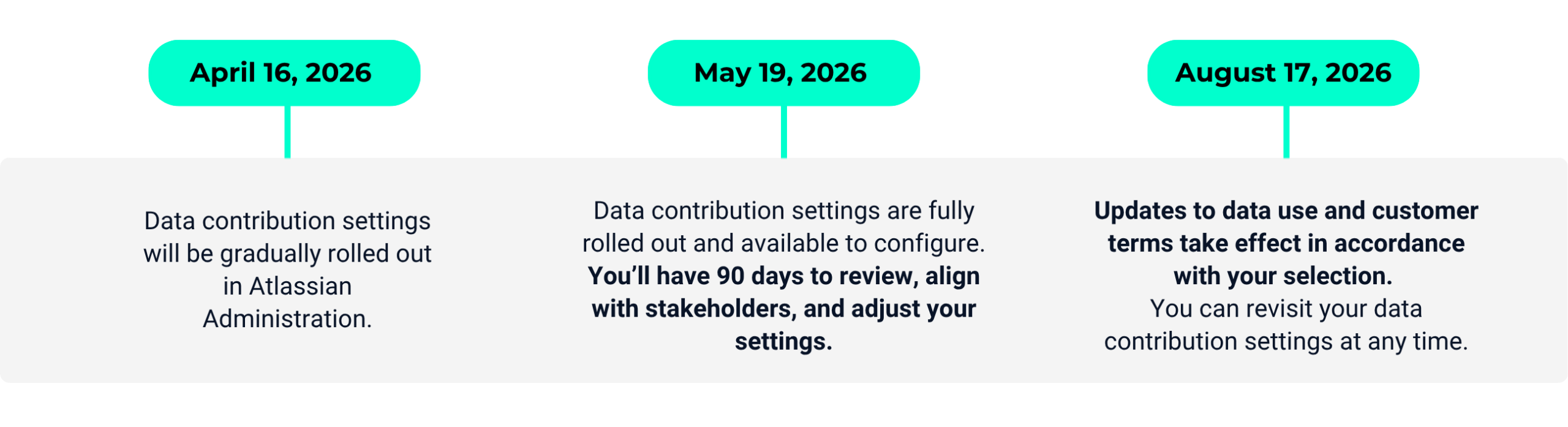
The Atlassian timeline for customizing your settings
What you should avoid
In practice, the issue rarely fails because of technology - but because of governance and timing:
- "We'll look into it later": The changes take effect on 08/17/2026. Those who wait until just before to review often fail to achieve clean stakeholder alignment (Compliance/Data Privacy/Security).
- Misunderstanding about responsibility: According to Atlassian's DPA, your product settings are considered legally binding, "documented instructions" to Atlassian. This means Atlassian does not decide for you – but you must actively decide what should be permitted in your setup.
- Unclear data terminology: Metadata, in-app data, de-identified, aggregated – many discussions go in circles because terms are not properly separated.
- Plan/Trial traps: Defaults depend on the Highest Active Plan – including trial versions. This means a trial can shift defaults without everyone being aware of it.
Recommandation: Take a two-track approach
- Governance first (clarify internally what is permitted): Which data may contribute (de-identified and aggregated) to product improvement – and which may not?
- Technical implementation second (applying settings exactly): Check and document your configuration in Atlassian Administration > Security > Data contribution, and only apply it finally after approval.
So you remain capable of acting: You support AI innovations where they make sense and are compliant for you - and switch off where your requirements demand it.
Your checklist: 6 concrete steps
Step 1: Use timeline & time slots correctly
Atlassian communicates the changeover with a clear roadmap:
- April 16, 2026: Rollout of the data contribution settings begins (step by step).
- May 19, 2026: Rollout completed, settings fully available.
- August 17, 2026: Changes take effect (according to your selection).
Important to note in parallel: The framework (DPA) has already been effective since October 2024 and describes the framework in which Atlassian acts as the Processor and you decide as the Controller.
Governance Note: The DPA also anchors a 72-hour standard for "Security Incidents": Atlassian informs the customer without undue delay and – where possible – at the latest within 72 hours after Atlassian becomes aware of an incident. This is a good trigger to go through your internal incident response processes (Security/DPO/Legal) once: Who receives the notification, who evaluates it, who escalates it – and what evidence do you need for an audit?
Practical Tip: It is also important to note: The framework (DPA) has already been effective since October 2024 and describes the framework in which Atlassian acts as the Processor and you decide as the Controller. Plan for at least 4–6 weeks internally to finalize coordination with Compliance/Data Protection – especially if multiple products/orgs/connectors are affected.
Step 2: Separate metadata vs. in-app data for risk assessment
For a reliable risk assessment, you must separate:
- Metadata: Content attributes (e.g. readability values, story points, end dates) + 'common patterns'. Atlassian focuses on high-frequency patterns and leaves out unique/rare information.
- In-app data: Real content such as page titles, Jira descriptions, comments.
Important to note: Before use, data is de-identified and aggregated at the customer level so that it can no longer be assigned to individual users. Additionally, Atlassian can retain this de-identified, aggregated data for up to seven years to monitor trends and improve models.
Important governance argument from the statement: Atlassian commits itself technically and politically to "Un-learning":
- If you opt out or delete an app, Atlassian commits to retraining models that were trained on this data.
- Removal from training sets: In-app data within 30 days, content attributes within 90 days.
This is a key point for many compliance discussions because it goes beyond 'from now on no more' and also addresses 'training data already in use'.
Practical Tip: For Security/Compliance, it makes sense not to make a blanket assessment ("AI = no"), but a data-type-based one: metadata and content are viewed with different levels of criticality in many companies.
Step 3: Check your defaults - they depend on your plan (incl. trials)
A frequent 'aha' moment: Data protection defaults are linked to the subscription model. Atlassian handles it as follows:
| Plan | Metadata | In-app data | Control options |
|---|---|---|---|
| Free/Standard | Always shared | On (standard) | In-app data can be disabled. Metadata cannot be changed. |
| Premium | Always shared | Off (default) | In-app data can be enabled. Metadata cannot be changed. |
| Enterprise | On (standard) | Off (default) | Both settings can be enabled and disabled. |
Nuances that hurt in everyday life:
- Trials count: A premium trial can change defaults.
- Downgrade from Enterprise: You lose metadata control; Atlassian gives you a 30-day review phase, before metadata is automatically activated.
Practical Tip: Record plan/trial events in your admin change log, as they indirectly influence "privacy defaults."
Step 4: Use the 30-day 'grace period' for new apps
When a new app is added to the organization, Atlassian provides a 30-day grace period before metadata or in-app data from that app are included in usage. This is your window for a mini-PIA (Privacy Impact Assessment) and settings adjustments.
Space Exception: This grace period does not apply to new spaces/projects within an app that is already contributing. Example: If Confluence is already set to Contribution, a newly created space contributes immediately.
Practical Tip: If you frequently create new spaces/projects (e.g., per team/program), you need clear guardrails (naming, space templates, classification, possibly excludes), not just a one-time setting decision.
Step 5: Inform your compliance officer before you click
From an admin perspective, this is the 'compliance-safe move':
- You proactively inform the body responsible for data protection (Compliance/DPO) about the planned data usage and the available configuration options.
- You finalize the opt-in/opt-out only after explicit instruction/approval.
- Additionally important (and often forgotten): If you have "Authorized Affiliates" (subsidiaries/partners running under your org), you, as the primary contracting party, are the central coordination point. Your org setting therefore also binds their data.
Practical Tip: Build a communication matrix: Who needs to be informed (Compliance, Legal, Security, Data Owners, Affiliates)? and who gives final approval?
Step 6: Implement data contribution technically (and think about scope exceptions)
Depending on the plan, you can deactivate metadata and/or in-app data or exclude certain apps/spaces/teamwork graph connectors.
Practical example:
- Confluence contains a lot of sensitive content → you define stricter rules for in-app data.
- Jira projects tend to contain structured tickets → you allow metadata contribution (or vice versa, depending on the policy).
Practical tip: Treat this configuration as a security-relevant change:
- Change ticket
- Four-eyes principle (admin + compliance)
- Documentation in the admin manual
- Review date (e.g. annually or when changing plans)
Summary
- Save the date: On August 17, 2026, Atlassian's data practices for AI/apps will change – with a prior rollout of settings starting in April/May 2026.
- Your settings are legally relevant: Your product configuration is (in the sense of DPA logic) your "documented instruction" – you must actively manage it.
- Metadata ≠ In-app data: Only those who separate the data types can perform a reliable risk assessment.
- Defaults depend on the plan (including trials): The Highest Active Plan determines what is active by default and what you can modify.
- Best practice: First stakeholder alignment (compliance), then technical implementation including documentation and review.
If you need support in properly setting up your data contribution decision (stakeholder alignment, documentation, technical implementation, connector/scope design): XALT supports you from assessment to implementation in a pragmatic and compliant manner.
Atlassian is also offering a live webinar on April 28 and 29. Among other things, it deals with the scope of the changes, protection mechanisms (e.g. de-identification & aggregation) and the practical configuration of the data contribution settings in the Atlassian administration - including Q&A with Atlassian experts.