There are countless tools for managing human resources. It is usually important that these are easy to implement and can be used by all employees in personnel management as quickly as possible. However, new tools usually require onboarding, training, or additional know-how. But what if your company already uses Jira? Then it makes sense to use the flexibility of Jira in the area of human resources or applicant management as well.
Jira - The all-purpose weapon in process and project management
Companies usually use a wide variety of tools. These not only create a gap in the monthly budget but must also be usable by employees. Due to the complexity of all the apps used, it often makes little sense to introduce new tools for every area.
But what if your company already uses Jira or Jira Service Management for project management or the digitisation of business processes?
You already know what Jira can be used for, and your employees and teams use it daily and know how to handle it.
That is exactly when it makes sense to consider whether Jira or Jira Service Management should also be used as a tool for managing all personnel-related processes.
The question that therefore arises: Does Jira provide all the necessary functions to map and manage my human resources processes and projects?
Why is Jira perfectly suited as a human resource management tool?
Human Resources with Jira
Jira Software was originally launched as an IT project management tool and has been continuously expanded with additional options. From a tool that was mainly used in IT, a tool has eventually emerged, through the use of numerous plugins, integrations, and updates, with which virtually any type of project and process can be mapped. Particularly in the area of human resources with Jira, the versatility and the possibilities that this tool offers become apparent.
By applying human resources with Jira, companies can work more efficiently and simultaneously increase employee satisfaction. This tool offers not only a platform for applicant management but also for the automation of HR processes.
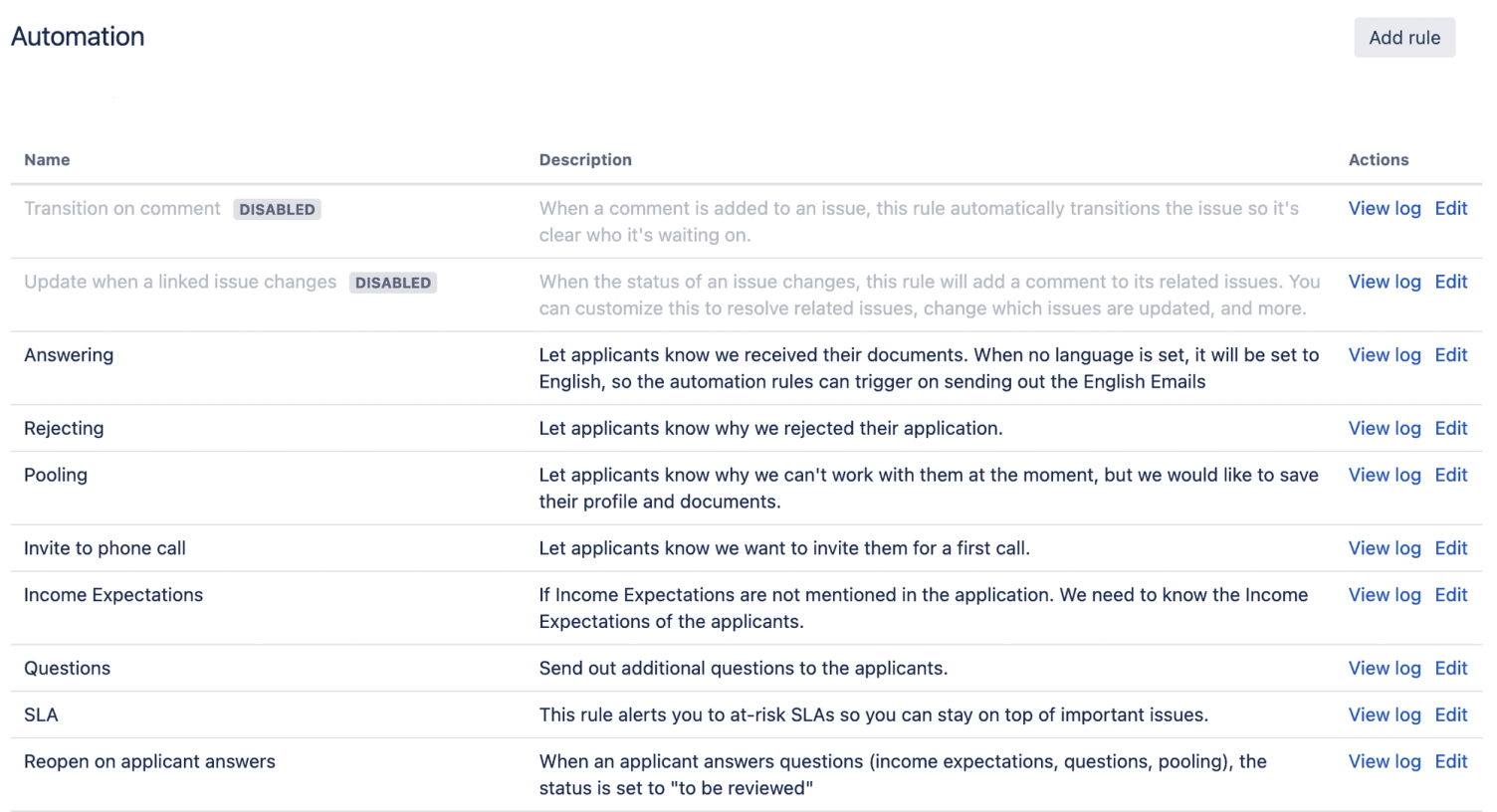
Automations: Save time on repetitive tasks
Managing Human Resources with Jira enables improved tracking of applications and easy integration of feedback loops for optimised communication.
In Jira or Jira Service Management, you can, as an HR Manager, simply create a project (e.g., Applications) and configure it exactly to your specifications. You are likely already familiar with Kanban or SCRUM boards, where you can display the various statuses of project steps.
Automatic notifications - Email, Slack, Microsoft Teams
When a new application is received, a simple automation can send a notification via email to the applicant, and you, as the HR Manager, will receive a notification in your preferred internal communication tool, such as Slack or Microsoft Teams.
Manual emails thus belong to the past. The cool thing is that emails can be saved as templates, personalised, and additionally branded with your company's branding.
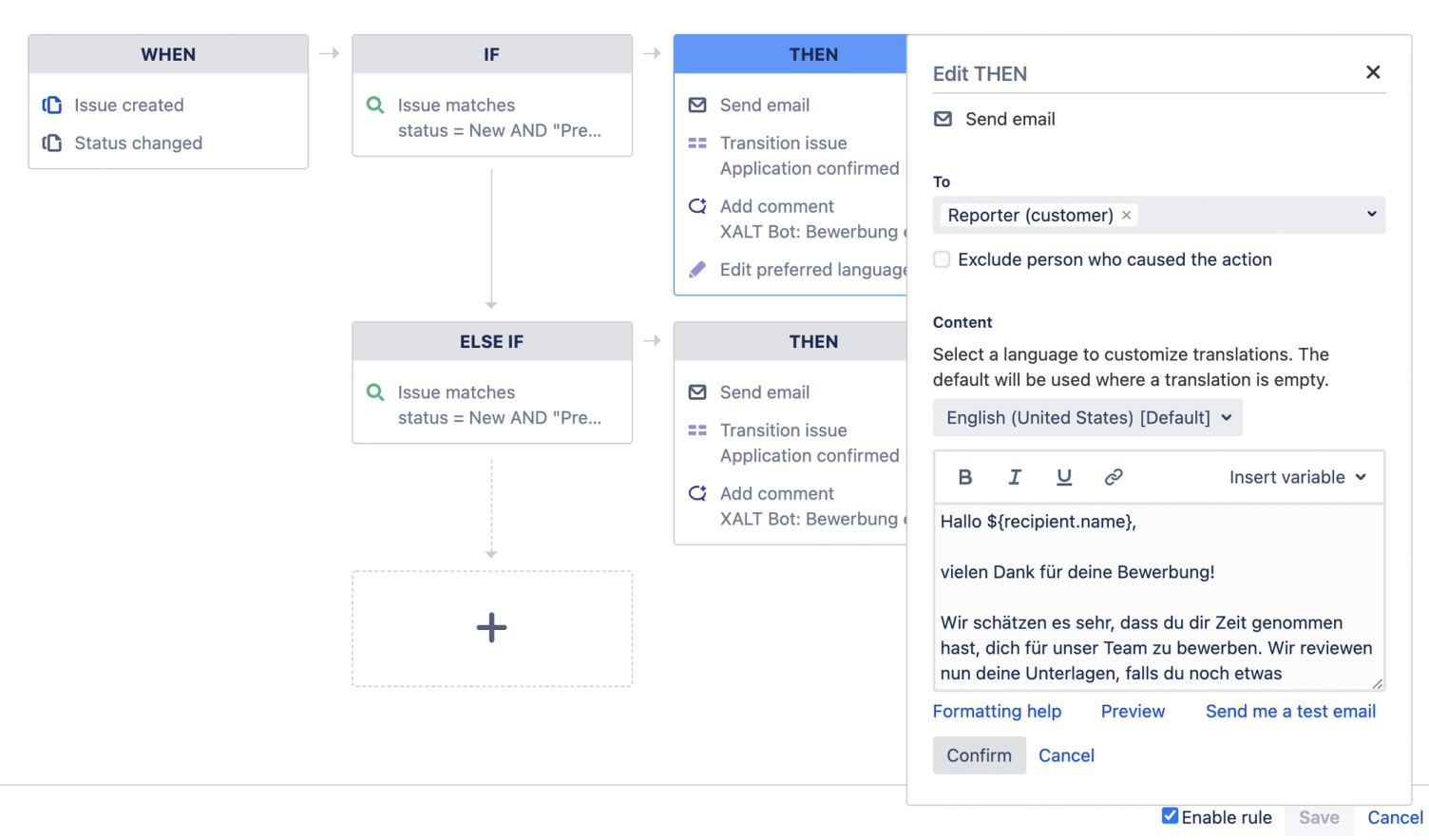
But wait. That is not all that is possible with automations. For example, if an applicant forgets to specify their desired salary, you can simply set the Jira ticket status to “Salary unknown,” and the applicant will immediately receive a notification requesting them to provide their desired salary.
What types of automatic notifications can be created:
- Confirmation of application receipt
- Response to open questions
- Status-dependent emails: Receipt, Rejected, Open questions, Interview invitations, etc.
- Reminder / Follow-up emails
- Notification to the HR Manager when applications are not processed
Automatic change of responsibilities and the associated project upon status change
Of course, the application process is only a small part of Human Resources. This is usually followed by onboarding, employee satisfaction surveys, offboarding, etc.
These processes can also be organised and digitised with the help of Jira. For example, the moment an applicant successfully completes the application process, a Jira ticket can be transferred to a separate project for onboarding, and the responsible employee can be automatically changed if needed.
As the Jira ticket is now in a different project (Onboarding), it, or the new employee, goes through further steps in the Human Resources process. Here, too, further automations can be configured in Jira to digitise certain process steps.
Further possible automations and digitisations of the HR process:
Another advantage of Human Resources with Jira is the possibility of data security, as all information is protected and accessible only to authorised persons.
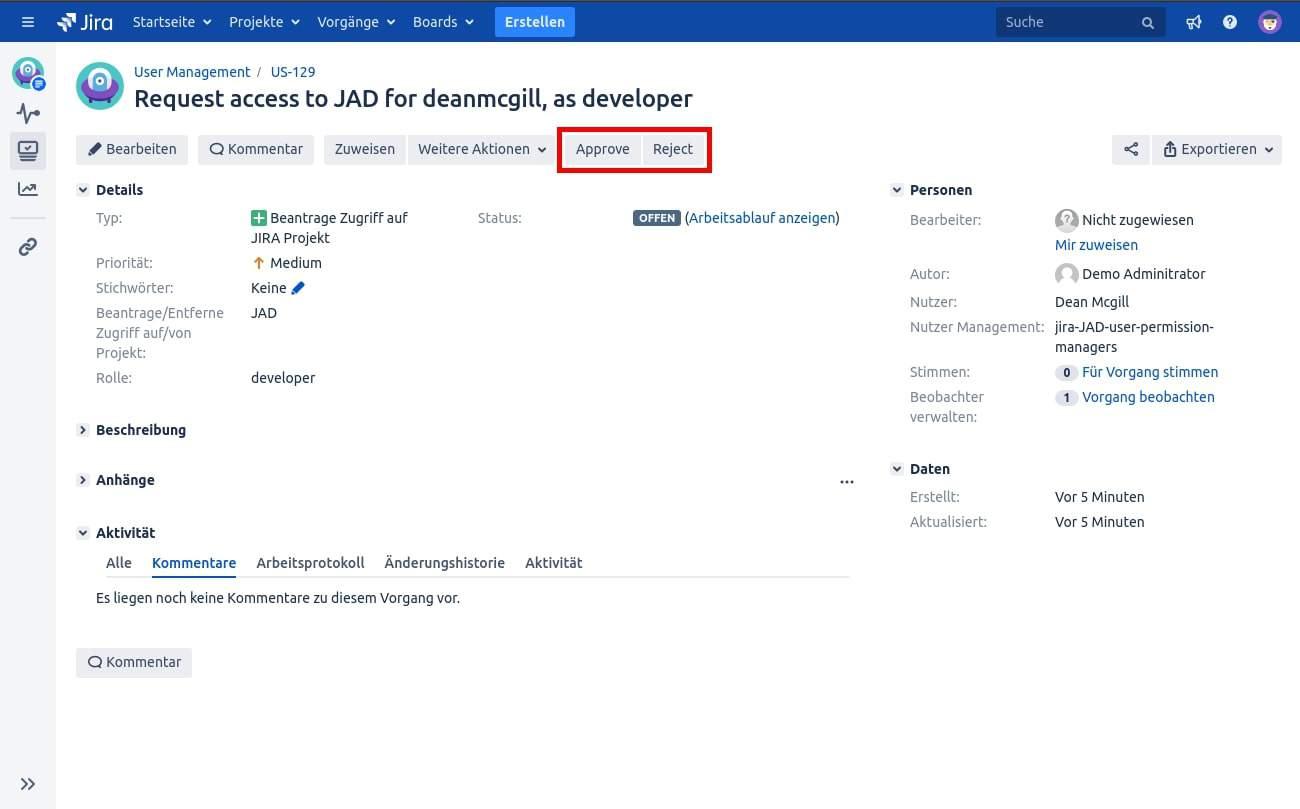
Approval processes: Identity Access Management (IAM)
Not every employee needs the same rights and permissions in your company. New employees will probably need access to the most important communication tools such as Slack, email, or a CRM system like HubSpot. For employees from HR or Marketing, on the other hand, it usually makes no sense to have permission for software development tools.
Or your company works with Jira in all projects and uses Confluence for documentation. Access restrictions can also be added here.
With the specific automations, every stakeholder always knows which employee needs which permissions, without you having to write a single email yourself.
You want to learn more about Identity & Access Management? You can find more about our IAM solution here.
Automatic time tracking with Jira and Tempo
Another essential tool in many companies is the time tracking of employees to draw conclusions about performance and identify potential for improvement. For this, you can use the Jira plugin Tempo and establish automated time tracking in your company.
In addition, Human Resources with Jira enables transparent communication between departments and better coordination of onboarding processes.
Further features using Onboarding as an example
As an HR manager, you of course have further tasks to complete during Onboarding. New employees often need a laptop and other equipment to work. Therefore, Jira tickets can be adapted so that several departments are notified as soon as the status of the Jira ticket changes.
In our example, a notification is sent to the IT department, which can then immediately proceed to order the hardware and subsequently give their “OK” in the ticket and attach proof of the hardware order.
A similar approach is possible in this case for permission management. With a status change of Jira tickets, all involved stakeholders are automatically informed. As you can see, the possibilities for digitising your Human Resources process with Jira or Jira Service Management are almost limitless and can be tailored specifically to your requirements.
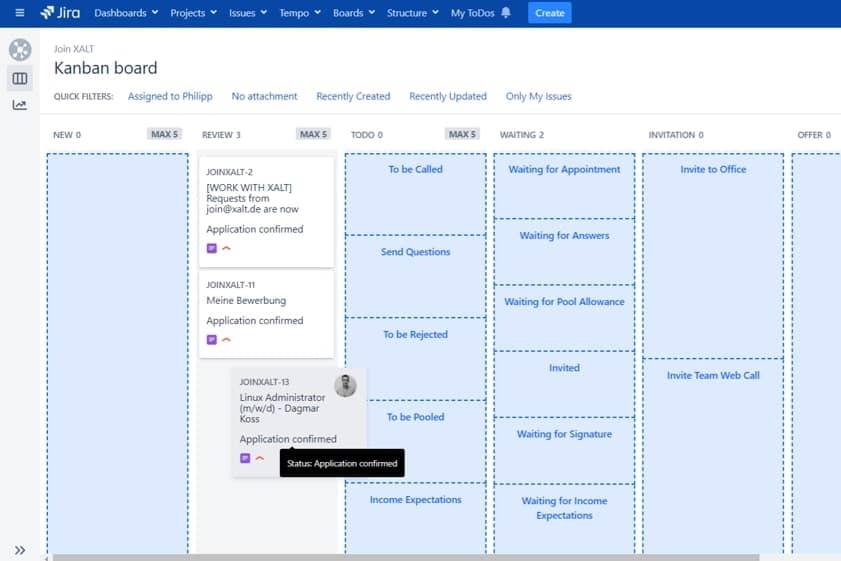
Map HR workflows in Jira
The aforementioned processes are, of course, not just floating in the air; they are represented as workflows in Jira (Service Management), which can then be visualised in the form of a Kanban board.
This allows you to always keep track of all active tickets and ensure that you do not overlook any new applicants or forget important steps in the further onboarding process.
However, workflows in Jira offer additional advantages. For one, they can be configured so that, for example, all necessary steps must be completed before an applicant or employee progresses further in the process. It is conceivable, for instance, that new employees may only receive their equipment after signing the contract, or that applicants should only be invited to an office appointment after a phone screening.
The use of Human Resources with Jira leads to more efficient administration and a clear structure in HR processes, which can be individually adapted to the needs of the company.
Additionally, it is possible to configure tickets so that a status change (e.g., onboarding completed) can only be made once all involved handlers or departments have processed the ticket. Such dependencies can, of course, be flexibly configured and adapted to existing company processes and ways of working.
Data protection and security in the Human Resources process
Personal data and the security of IT systems remain among the most important topics for many companies in 2021.
In particular, the HR department deals daily with personal and private data (address, date of birth, bank details, etc.). This requires special protection, must under no circumstances be leaked, and must comply with certain legal regulations.
With Jira (Service Management), for example, applicant data is automatically deleted within the statutory obligation and is therefore no longer viewable by the company. However, the software from Atlassian also offers important security measures for the IT infrastructure for active employees.
Because projects in Jira can only be viewed by authorised persons, sensitive data can be protected from uninvolved persons within the company.
GDPR & GDPR Compliance
Many companies receive applications directly via their own website and use forms for this purpose. With Jira, we use the so-called Issue Collector for this. The data provided is protected on the one hand by a provided SSL certificate and on the other hand, the Jira Issue Collector is secured by an additional level (encryption) which encrypts all sent emails. Furthermore, the Issue Collector collects no cookies or data for marketing purposes. This ensures that all collected data is collected, stored, and deleted in compliance with GDPR and GPDR.
You can find out how to add the Jira Issue Collector to your website in our guide.
Reporting & OKR
As an HR manager, you probably often have to deal with reporting and OKRs, present your results in regular meetings, and conduct feedback conversations with employees. In any case, it is time-consuming and tedious to create manual reports. This is where the Tempo plugin comes into play again. It allows performance reports to be created automatically at any time, for example, to trace how long which employee has been working on which tasks.
With the integrated notification function within Jira, you can then, as an HR manager, directly create feedback meetings and exchange views with individual employees and, if necessary, jointly design a more efficient task distribution.
Integrations and plugins: job portals, Microsoft Teams, Slack, HubSpot and your own website
To simplify communication between all parties involved, it is possible to add integrations or plugins to Jira (Service Management). This allows you to set up an interface to the most commonly used communication tools such as Slack, Microsoft Teams or your email service.
Plugins for external tools
Slack for Jira
With Slack for Jira, you are notified directly when, for example, a new application is received. With the plugin, you can additionally:
Overall, Human Resources with Jira is an effective solution for optimising and automating all HR-relevant processes, which in turn increases the efficiency of the entire company.
- Send personalised notifications to you and your channels.
- If you have connected a project to a Slack channel, a Jira bot automatically displays a preview of tickets in Slack in which you have been mentioned.
- Use /commands to manage and search for Jira issues in Slack.
Here is the link to the plugin:
- Jira Server: https://xalt-team.slack.com/apps/ADZHDM3L1-jira-server
- Jira Cloud: https://xalt-team.slack.com/apps/A2RPP3NFR-jira-cloud
Microsoft Teams for Jira
With the Microsoft Teams plugin, you can work on or manage your Jira tickets directly from the app, similar to the Slack integration:
- Search for a project you want to work on
- Edit tickets directly in Slack
Here is the link to the plugin:
- Atlassian Marketplace: https://marketplace.atlassian.com/apps/1217836/microsoft-teams-for-jira?hosting=cloud&tab=overview
- Teams: https://appsource.microsoft.com/en-us/product/office/wa200002140?tab=overview
Website Integration and Email Notification
As already discussed above, Jira can be easily integrated into your website using the so-called Issue Collector. This ensures that all new applications are added directly to a project in Jira Service Management. This way, you always have all applications in one place and can manage and automate your Human Resource process using the previously created workflows.
In addition, as explained in more detail above, an automatic notification is sent to your email address for each incoming application.
Another advantage of applications via the Issue Collector is that no accounts need to be created for applicants, and only a few form questions need to be answered. In addition, interested parties can attach their CV, certificates, or other documents directly to the application and upload them via the Issue Collector.
Integration of Job Portals and Job Boards
At XALT, we use a direct but innovative integration of various job portals into Jira Service Management. To do this, we use, among other things, the Jira REST API and translate application submissions directly into a Jira ticket.
This means nothing stands in the way of publishing jobs on the job platforms of your choice.
HubSpot and Other Tools for Email Automation
The flexibility of Jira (Service Management) also allows you to integrate other tools such as Hubspot directly into your workflows. For example, through a simple email automation in Hubspot, you can forward applications directly to Jira and continue with your HR processes as usual.
Summary
With Jira or Jira Service Management, you can easily digitise and automate your HR process without having to change systems. In addition, Jira offers a wide range of integrations and plugins with which you can integrate your most frequently used communication tools.
The integration of Human Resources with Jira not only simplifies administrative tasks but also leaves more time for strategic HR work.
The flexibility of Human Resources with Jira allows for the consideration of specific company requirements and the development of tailored solutions.