73% of your customers expect their query to be resolved within 24 hours. Yet your team is struggling with outdated tools, fragmented data, endless email chains, and constantly recurring requests. The result? Frustrated customers, overworked employees, and a reputation that is slowly but surely taking damage.
Classic support systems – whether Excel lists, isolated ticketing tools, or static FAQ pages – are no longer up to date. Classic support systems cost you money, nerves, and customers. But there is a way out. In this article, we show you why classic support systems fail, how to stop the consequences – and with which step-by-step strategy you can revolutionise your support.
Classic support systems are often the reason why companies struggle to keep up with the competition. Adapting to modern technologies can make the difference. In this article, we explain the essential steps to move from classic support systems to a powerful, integrated solution.
Classic support systems often show their weaknesses in data integration and processing. This leads to inefficient customer service, which negatively impacts customer satisfaction. By switching from classic support systems to a modern solution, you can close communication gaps.
5 problems why classic support systems fail
A common problem with classic support systems is the inefficient use of resources and time. These systems often lead to frustrations, not only among your customers but also within your teams. Classic support systems require a paradigm shift if you want to create a positive customer experience and increase efficiency.
Problem 1: Fragmented tools – the silent productivity killer
Your team uses emails for customer inquiries, a separate ticketing system for internal tickets, and dusty Confluence pages as a knowledge base.
Result:
- Duplication of work: Customer support employees spend hours searching for information.
- Inconsistent answers: Customers receive different solutions – depending on which employee responds.
- Error-proneness: Critical tickets fall through the cracks because departments do not communicate.
Think of the last major customer who left due to a delayed solution. Or the overtime your team put in just to manually transfer data between tools. Every minute spent on these inefficiencies costs you up to 30% of your support budget – and drives your customers to the competition. The churn rate rises dramatically.
Solution:
- Step 1: Throw out all isolated tools. Rely on a central platform such as the XALT Customer Support Portal, which unifies Jira Service Management (JSM), self-services, knowledge bases like Confluence, communication tools like Slack and Teams, and security tools like Atlassian Guard.
- Step 2: Integrate all departments – from IT support to the HR team – into one system. This allows every agent to see the status of every ticket, and customers receive help through a single, central channel.
Problem 2: Reactive support – you are putting out fires instead of preventing them
Your team is working in crisis mode: Every ticket is a new fire that needs to be put out. But why do the same problems keep happening?
- Manual ticket assignment: Support staff spend 60% of their time on routine tickets.
- No predictions: You only recognise trends when it is too late (e.g. server outages during the Christmas period).
Imagine you could predict peak loads – but you do not.
The result: Your team is overwhelmed, customers wait days for answers, and your CSAT scores (Customer Satisfaction) plummet.
35% of customers permanently abandon support after a bad experience.
Companies with poor customer service have a 15–25% higher churn rate than industry benchmarks.
Specific figures:
- After 1 bad experience: 33% of customers immediately switch to a competitor (PwC).
- After 2–3 negative interactions: 52% of customers cancel (Zendesk).
- In high-risk industries (e.g. telecoms): Poor support drives the churn rate up to 30% per year (McKinsey).
Solution:
- Step 1: Use AI like Rovo (Atlassian's AI model) to analyse historical ticket data. The AI recognises patterns and warns you, for example, of increased inquiries regarding product launches.
- Step 2: Automate ticket distribution. Rovo routes complex tickets directly to experts, while the chatbot resolves routine inquiries.
- Statistic: Companies using predictive analytics reduce their escalation rate by 30%.
Problem 3: Self-service? Not a chance!
Your customers want to help themselves – but your FAQ page is outdated, and the search only returns irrelevant results. So:
- 50% more tickets that could easily be avoided.
- Customer frustration: “Why can’t I find the password reset instructions?”
Every unnecessary ticket costs you up to €15 (according to Gartner). Scale that up to 100 avoidable tickets per week – that’s €78,000 of wasted budget per year.
Solution:
- Step 1: Build an AI-powered knowledge base with Confluence. Rovo doesn’t just search for keywords; it understands natural language. Example: A customer types “I can’t log in” – Rovo immediately shows the password reset instructions.
- Step 2: Implement a chatbot for simple queries (order status, account details, etc.).
Problem 4: Security vulnerabilities – the invisible danger
Sensitive customer data is stored in unsecured Excel files or personal inboxes. You hope nothing goes wrong – but compliance audits are looming.
- Data leaks: A single click on a phishing link can bring your system to a standstill.
- Fines: Up to 4% of annual turnover for GDPR violations.
60% of companies were sued in 2022 due to inadequate security processes. Imagine your company making headlines because customer phone numbers end up on the dark web. The reputational damage is irreparable.
Solution:
- Step 1: Use Atlassian Guard to automatically control access. Only authorised agents can see customer data.
- Step 2: Encrypt all communication channels in the support portal – whether for internal or external users.
- Step 3: Automatically log every action. During audits, you can provide all evidence with just two clicks.
Problem 5: Teams work in different tools despite overlaps
Your developers use Slack and Jira, support agents work in Jira Service Management, and the documentation is in Confluence. No one knows what the other is doing.
- Miscommunication: A bug is worked on twice, and a customer receives contradictory statements.
- Missed SLAs: Critical tickets disappear into the void.
According to a study by McKinsey, teams spend 20% of their working time searching for information across tools. That is a full working day per week.
Solution:
- Step 1: Connect Jira Service Management with Confluence. When an agent creates a ticket, they directly link the relevant guide – and tag the responsible developer via @Mention.
- Step 2: Use shared dashboards to set priorities. Everyone can see in real time which tickets are urgent (e.g., payment errors) and which can wait (feature requests).
Problem 6: You are flying blind – without data
You make decisions based on gut feeling: Should you hire more support staff? Which training is needed? But without clear metrics, it is pure speculation.
- Uncertainty: You do not know why CSAT scores are falling.
- Misinvestments: You buy tools that do not solve real problems.
Companies without data-driven support waste up to 45% of their budget on inefficient processes (Source: Forrester).
Solution:
- Step 1: Use JSM dashboards to track real-time data on SLAs, agent performance, and ticket trends.
- Step 2: Let Rovo analyses identify causes. Example: The AI shows that 70% of tickets stem from an unclear installation process – so you optimise the guide.
The solution: How to modernise your support in 5 steps
Step 1: Inventory – break down your current system into individual parts
What you need to do:
- Create a tool list: Write down all the tools your team uses – from email clients to Excel spreadsheets. Ask yourself:
- “Which tool takes up the most time?”
- “Where do agents have to transfer data manually?”
- Analyse pain points:
- Conduct anonymous team surveys: Ask agents where they get stuck on a daily basis (e.g., “I spend two hours a day searching in Confluence”).
- Track ticket cycle times: Use Jira reports to see how long tickets “sit” between departments (e.g., a three-day wait time between Support and IT).
Example:
A financial services provider discovered that 70% of tickets were caused by outdated password policies. The solution: a central portal with automated reset links.
Step 2: Integration – build an all-in-one platform
How to proceed:
- Choose the core system: Decide on a base platform such as Jira Service Management (JSM), which integrates seamlessly with Confluence, Slack or Microsoft Teams.
- Migrate incrementally:
- Phase 1: Start with internal support. Integrate HR and IT tickets into JSM.
- Phase 2: Bring in external customers via a self-service portal.
- Training:
- Create micro-learning videos (max. 3 minutes) for agents: “How to link a ticket in JSM with Confluence.”
- Reward early adopters: Give bonus points to agents who resolve the most tickets in the new system during the first month.
Practical tips:
- Avoid the “big bang”: Do not force all departments to switch over simultaneously. Start with a pilot team.
- Leverage automation: Set up Jira Automation Rules to, for example, automatically escalate tickets based on SLA duration, or automatically categorise tickets via keywords.
Step 3: Introduce AI – but strategically
How to use AI effectively:
- Start with low-hanging fruit:
- Chatbots for routine questions: Train AIs/Rovo with FAQs on top-10 topics (password reset, order status, invoices).
- Automatic tagging: Let AI categorise tickets based on content (e.g. “invoice”, “technical defect”).
- Adapt the AI to your data:
- Feed Rovo with historical tickets: The more data, the more precise the predictions (e.g. “Login problems increase by 15% every Monday”).
- Let agents provide feedback: If Rovo suggests an incorrect solution, the agent should be able to correct it with a single click – the AI learns from this.
But be careful:
No AI overkill: Do not completely replace human support. Use AI to free agents from routine tasks – not to replace them.
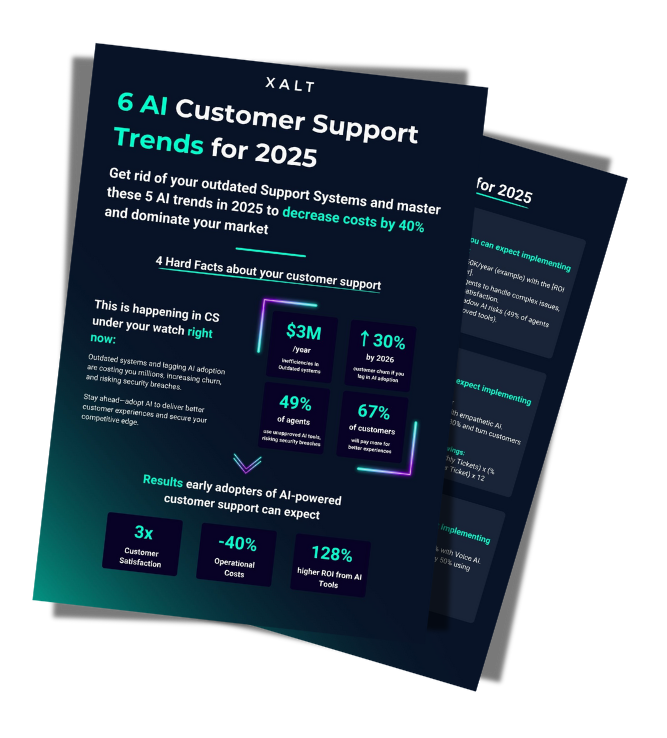
6 AI Customer Support Trends for 2025
Reduce costs, increase customer satisfaction and impress with AI-supported support.
ROI: How much you save with AI-powered support
Note: The following figures are based on real case studies from companies handling 50–100 support tickets per day.
| Metrik | Beispielwert | Berechnung | Jährliche Ersparnis |
|---|---|---|---|
| Reduced tickets | 50% fewer tickets | 500 tickets/month × €15/ticket × 50% reduction × 12 months | 45.000 € |
| Time saved per agent | 10 h/week | 10 h × €30/h (agent costs) × 5 agents × 52 weeks | 78.000 € |
| Avoidance of compliance penalties | 1 audit/year | Average GDPR fines: €50,000 – with Atlassian Guards: €0 | 50.000 € |
| Customer retention | 25% lower churn | 100 customers × €1,000/year revenue × 25% | 25.000 € |
| Total savings | Sum of all savings | 198.000 € |
Step 4: Automate security – without compromises
Specific actions:
- Define access rights:
- Internal users: HR can only view HR tickets, IT admins can view all technical tickets.
- External users: Customers only get access to their own tickets and documents (via Atlassian Guard).
- Encrypt data:
- At rest: Encrypt all customer data in the database.
- In transit: Use TLS 1.3 for communication between the portal and users.
- Proactive monitoring:
- Set up alerts: If someone enters the wrong password 10 times in a row, block the account automatically.
A dedicated Identity & Access Management solution for monitoring and granting access rights is crucial here. We show you what such a solution can look like in a customer success story from the security-critical financial sector. Go to the success story
Compliance checklist:
- GDPR: Automatically delete customer data after 30 days (via JSM automation).
- ISO 27001: Store audit logs for 7 years (with Atlassian Guard).
- PCI-DSS: Never store personal data in plain text.
Step 5: Use the data – become an analyst
How to turn numbers into actions:
- Define KPIs:
- Primary: First Response Time, CSAT, Ticket Throughput.
- Secondary: Self-Service Rate (how many tickets were resolved via AI/FAQ?).
- Create weekly reports:
- What is working? Example: “Thanks to Rovo, the self-service rate increased from 12% to 34%.”
- What is blocking? Example: “Tickets in the ‘Payment Error’ category take 3x longer than average – why?”
- Iterate:
- Test small changes: If CSAT scores are low for technical tickets, train agents in technical communication for 1 week – and measure the effect.
Tools for advanced users:
- Predictive Analytics: Use AI/Rovo to predict bottlenecks (e.g. “Next week, login tickets will rise by 20% – ensure 2 additional agents”).
- Sentiment Analysis: Let AI scan customer messages for frustration (keywords like “frustrated” or “disappointed”) and prioritise these tickets.
Bonus: How to convince sceptical stakeholders
- Calculate the ROI:
- Cost savings: (Number of avoided tickets x €15) + (Time saved per agent x hourly rate).
- Revenue increase: Satisfied customers repurchase 3x more often (Source: Bain & Company).
- Showcase successes early: After 4 weeks of pilot operation, demonstrate how the first response time has improved – even if it is only by 10%.
Conclusion: The era of inefficient support is over
Classic support systems are like a car with wooden wheels – they move, but burn through time and money. Modern solutions like XALT’s Portal, based on Atlassian’s technology, combine AI, security and seamless collaboration.
The result: Happier customers, more relaxed support teams and a measurable ROI.
Act now: Request a free demo of the XALT Customer Support Portal.