You probably know this:
- In your department, there's an address like support@…, info@… or complaint@…
- Multiple team members have access to the shared mailbox.
- Everyone just grabs emails, replies directly from Outlook, and you hope nothing falls through the cracks.
In practice, it often looks like this: emails sit unanswered, ownership is unclear, and no one has the big picture. And as a department head or Head of Operations, you can hardly demonstrate how quickly your team responds, where things are getting stuck, or which topics are truly consuming your attention.2
In this article, we show you how to connect ashared mailbox to Jira Service Management (JSM)and transform your previously chaotic inbox handling into aclearly structured service processwith clear ownership, SLAs, and reporting. SLAs (Service Level Agreements) are your binding commitments,how quicklyyour team responds to requests andby whenissues should be resolved. These agreements can apply to customers, but also internally between your department and other areas.
Goal: You'll get a practical overview,withoutgoing deep into technical details.
What's going wrong today: Typical issues with shared mailboxes
Shared mailboxes are convenient – and that's exactly the problem. They simply grow over time without anyone deliberately designing the process behind them. Typical symptoms we repeatedly see with our clients:
- Lack of transparency
No one can see at a glance who is working on which email. There is no clear overview of what is open, in progress, or completed. - Unclear responsibilities
Employees pick and choose which emails to handle. Some topics get overlooked, others are answered twice. In the worst case, no one feels responsible. - No status overview
Neither the sender nor the team knows what stage a request is in. "Has anyone already replied to this?" is the standard question in the team chat. - Lack of traceability
Finding an older request or analyzing processing times is very time-consuming in traditional email inboxes – especially when multiple people are working on them.Studies showthat email overload can significantly reduce productivity and well-being. - No automation
Reminders, escalations, SLA monitoring, customer satisfaction – all of this must be handled manually, and in the worst case, it falls through the cracks entirely. In many organizations, important service requests end up in a 'black hole' as a result.
Especially when your departmentcustomers, partners, or internal stakeholdersis managed through a shared mailbox, a small convenience feature quickly becomes an operational risk.
The risk to your business
Unclear processes and a lack of transparency lead to three key risks:
- Low customer satisfactiondue to delayed or unanswered inquiries, with potential reputational and revenue loss.
- Inefficient resource utilizationdue to increased manual effort and lack of process optimization.
- SLA and compliance violationsas a result of insufficient traceability and delayed processing.
"According to Forrester, companies lose up to 25% of their efficiency due to fragmented systems and silos. Studies also show that employees spend up to two hours per day searching for information. Time that could be used more productively."
As a team lead, this means you lose control over key KPIs such as cycle times, response time compliance, and team utilization, making it difficult to provide reliable reporting to senior management or the board.
Affected KPIs:
- Processing times
- First Response Time (time until first reply)
- Number of open or overdue tickets
- SLA compliance rate
- Utilization per employee
Our solution: Bring the shared inbox into the JSM ticketing system
With Jira Service Management (JSM), you can directly connect your shared mailbox. Every incoming email is automatically converted into a ticket. This creates a structured workflow that enables transparency, traceability, and automation.
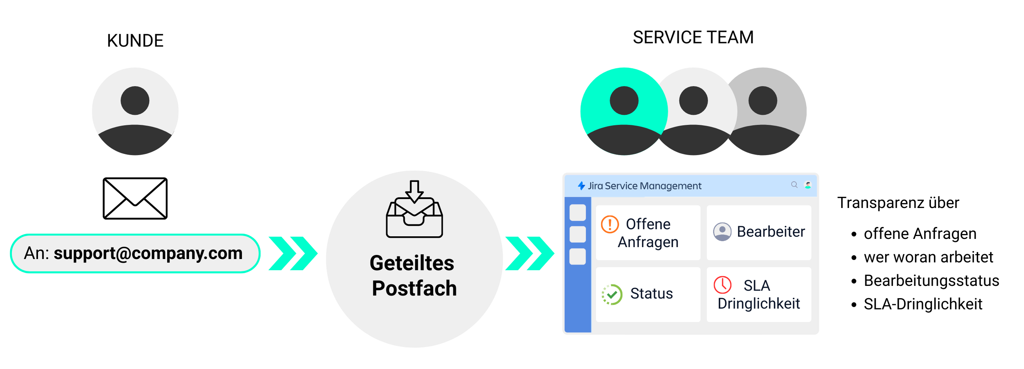
For the senders, almost nothing changes: they continue writing to the same email address. But behind the scenes, something entirely different is happening:
- Every email to your shared mailbox automatically creates aticket in JSM.
- The sender becomes theReporter, CC addresses becomeStakeholders involved in the request.
- Your team no longer works in the email inbox, but in so-called queues in JSM.
- A configured workflow maps your process: e.g.New → In Progress → Waiting for Customer → Resolved.
- SLAs, reminders, escalations, and reportingare handled through JSM, no longer by gut feeling.
This transforms an unwieldy inbox into a structured service solution.
If you already use JSM for other use cases (e.g., IT support, internal service requests in HR or Finance), you can intelligently extend your existing environment.
What I really love about our solution: All information, comments, and status changes are centrally visible within the ticket. This saves our clients endless back-and-forth and follow-ups. Through automation—such as reminders and SLA settings—the system essentially thinks along and ensures no request is left unattended.
Olga Beifus, Atlassian Consultant at XALT
This turns the shared mailbox into a transparent and scalable service process
For implementation, you typically need three roles:
- Your departmentdefines how the process should look (responsibilities, SLAs, escalations).
- IT or Atlassian Adminsets up the JSM project, the email channel, and automations.
- Email/Microsoft Adminadjusts the shared mailbox.
A possible standard workflow would then look like this:
- Email arrives in the shared mailbox
Example:beschwerde@organisation.deorservice@verwaltung.de. - Automatic Ticket Creation in JSM
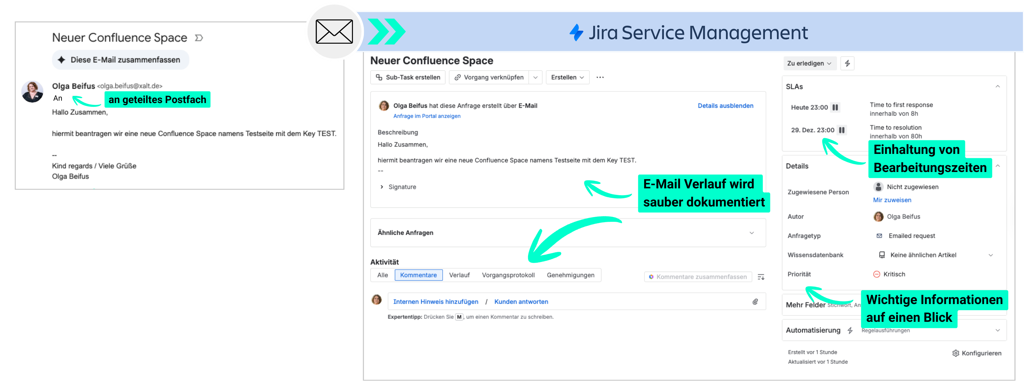
- JSM converts the email into a ticket (From = Reporter, CCRequest participants, subject becomes the ticket-summary, email content for thedescription).
- Processing by the team
- All employees who previously worked in the inbox are nowAgentsin JSM.
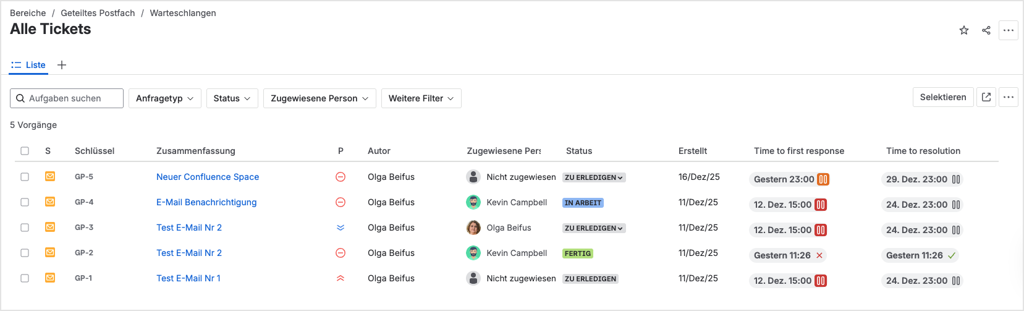
- Instead of "I'll take this email," there is a board or queue with all open tickets and a clear status such asOpen, In Progress, Waiting on Customer, Closed
- Communication from a single channelResult: All communication – internal and external – is consolidated in a single ticket.
- Responses to the customer are written directly in the ticket. Internal queries are added as internal commentsrecorded – invisible to the customer. If a customer response comes back via email, JSM detects this and automatically attaches it to the same ticket.
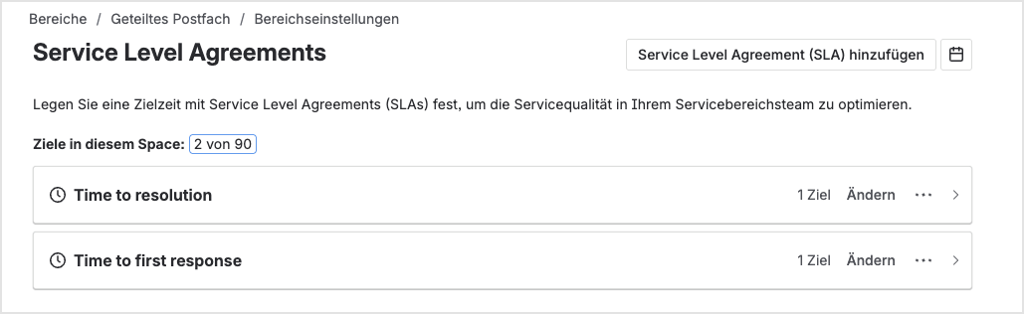
- SLAs, Reminders & Automations
- Tickets that remain in the 'Open' status for too long are automatically flagged or reported via email to the responsible agents.
- SLAs can define, for example, response time and resolution time
- Automations handle routine tasks, e.g.:
- When a ticket is set to "Waiting for Customer" and the customer responds, the status automatically reverts to "In Progress".
- When certain keywords such as "Complaint" appear in the subject line, a different workflow is triggered.
Benefits for your team
Why this matters to you: A relieved, well-informed team works faster, makes fewer mistakes, and keeps customers satisfied. This is directly reflected in your KPIs. For your team handling the requests, day-to-day operations change fundamentally – and for the better:
- Full transparency:
Visible at a glance: Which requests are open? Who is working on what? What is awaiting customer feedback? - Covering for leave and sick days made easy:
Instead of tediously searching through other people's inboxes, a quick look at a colleague's tickets is all it takes – e.g., via predefined filters or, optionally, an AI-powered query. - Better prioritization
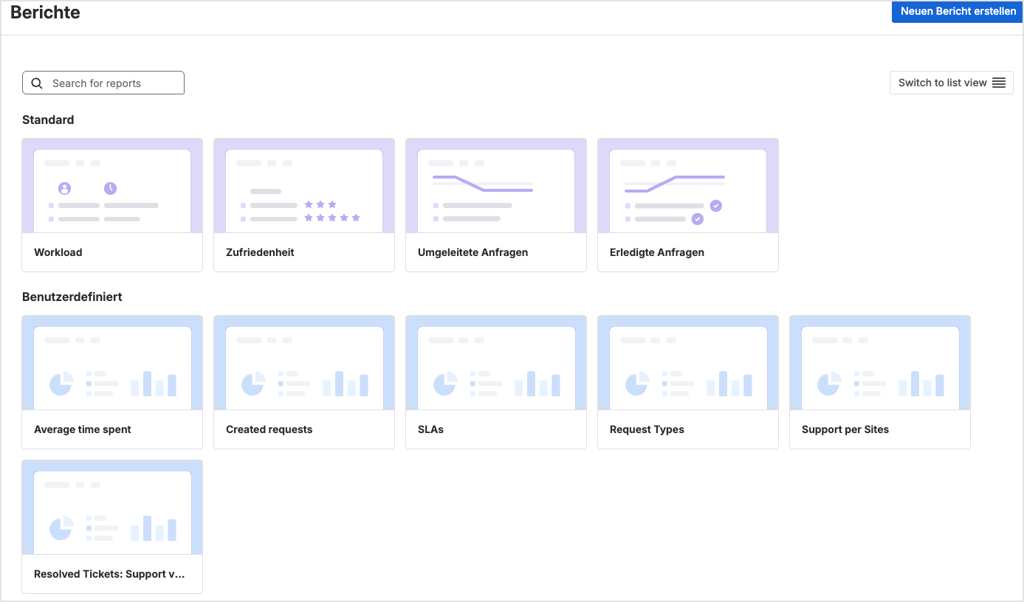
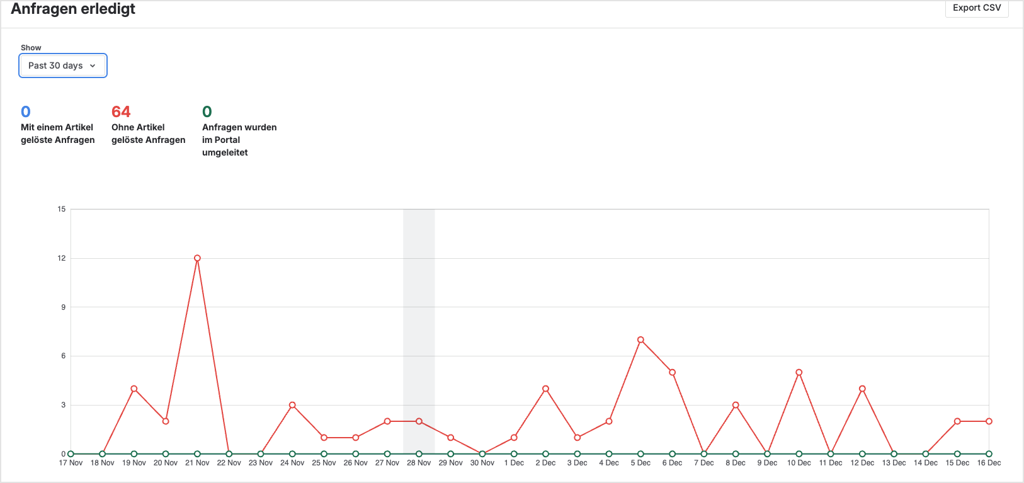
Sorting by, for example, SLA urgency, due dates, status, customer/sender - Measurability & Quality
Reports and dashboards enable you to track, among other things: How many inquiries are coming in? How quickly do we respond? How often are SLAs breached? How satisfied were customers with the resolution?
What customers and employees notice
Almost nothing changes for customers, if you don't want it to.
- They still send emails to the familiar address.
- They still receive emails as a response.
- Optionally, you can provide them with greater transparency, e.g.:
- Status updates ("Your request is being processed"),
- clear references (ticket numbers),
- and, where applicable, even access to a portal where they can view all their requests.
The real difference happens in the background, within the service team.
From a single solution to a cross-departmental service platform
As a department or operations manager, the key point is: this solution is not a one-off project for a single mailbox—it's a blueprint.
- You can roll it out to other departments, such as HR, Facility Management, and Marketing & Communications.
- You reduce tool sprawl and shadow processes (Excel lists, private to-do tools).
- You create a central platform where processes, tickets, and KPIs converge across departments.
This way, you build a unified service management framework step by step, rather than chasing five different siloed solutions.
Conclusion: Moving from email chaos to manageable service processes
- Shared mailboxes are convenient for low volume and small teams, butnot scalableTransparency, accountability, traceability, and reporting are lacking.
- With Jira Service Management, you can turn a shared inbox into aclearly defined service channelwithout forcing your customers to adopt new portals.
- The key is a deliberately designedworkflow, cleanly configuredemail channels , Queues for agents as well as SLAs and reporting for you as a leader.
- Once established, a tedious 'side inbox' becomes a measurable, automatable service process that can be rolled out to other departments – from marketing to HR to executive offices.
This turns an isolated improvement for a single shared inbox into a strategic step toward professional service management across departmental boundaries.
You gain greater transparency, better control, and a solid foundation for future growth.
Ready to implement the solution for your shared mailbox?
If you are currently managing one or moreshared mailboxesand feel that important inquiries are 'hiding' in them, now is the right time to take the next step.
Talk to us about your JSM implementation
Together, we analyze your existing shared mailboxes (support@, info@, complaint@ & Co.) and assess,
- where risks and blind spots currently lie
- which KPIs you can quickly surface with JSM
- and what a phased rollout in your department could look like
Request a consultation now