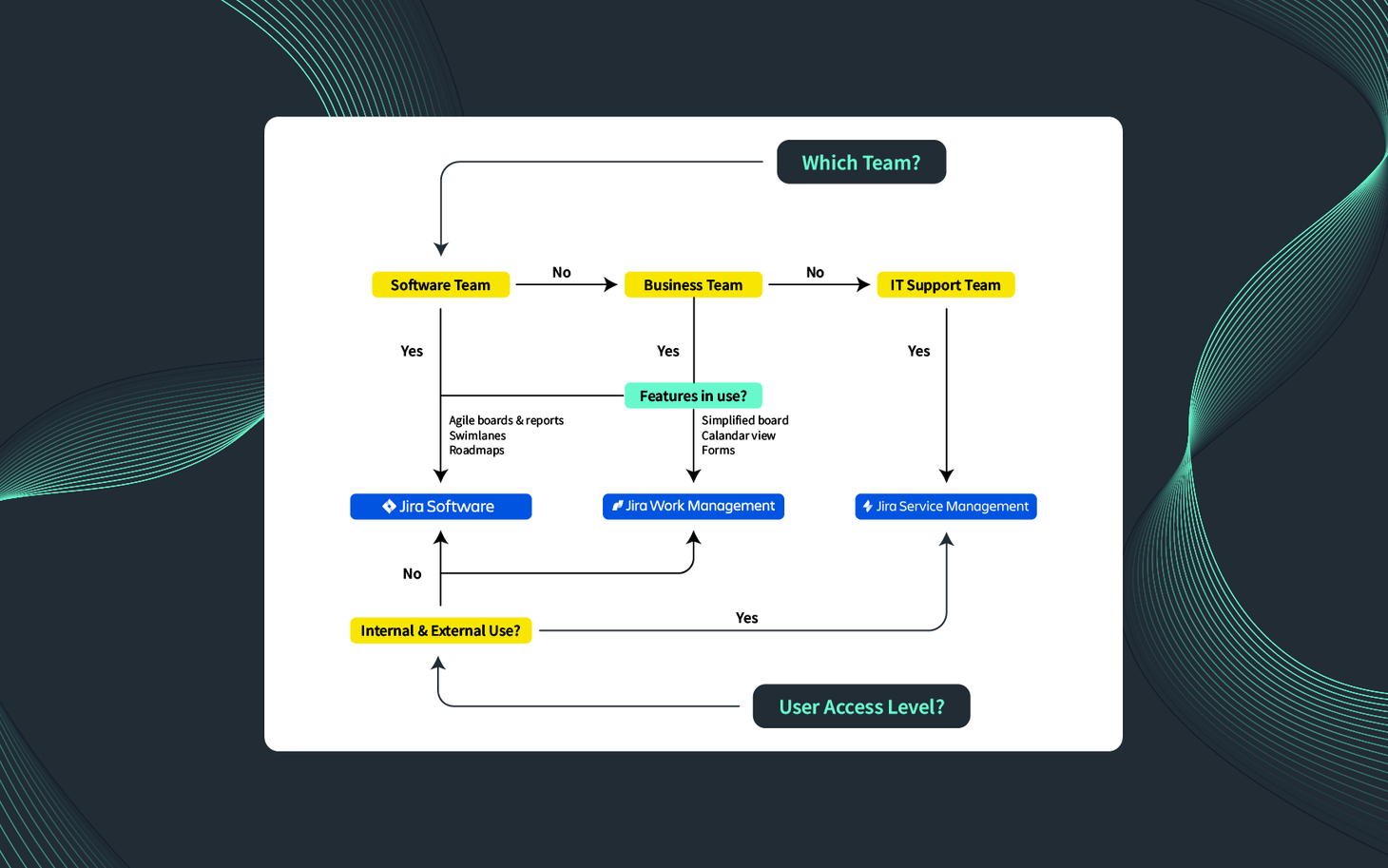
In today's fast-paced digital world, effective project management is the cornerstone of successful business processes. But how do you choose the right tool to manage your projects, optimise your workflows and boost your team's productivity? Dive into the world of Jira - a suite of powerful tools that will transform the way you work. In this comprehensive guide, we will examine the various products Jira Software, Jira Service Management and Jira Work Management in detail. By the end of this article, you will be able to make an informed decision about which Jira product is the best fit for your team.
Table of Contents
show
- Jira Software
- Jira Service Management
- Jira Work Management
- Take action: Speak to our Atlassian consultants
- A comparison: Jira Software vs Jira Service Management vs Jira Work Management
Jira Software
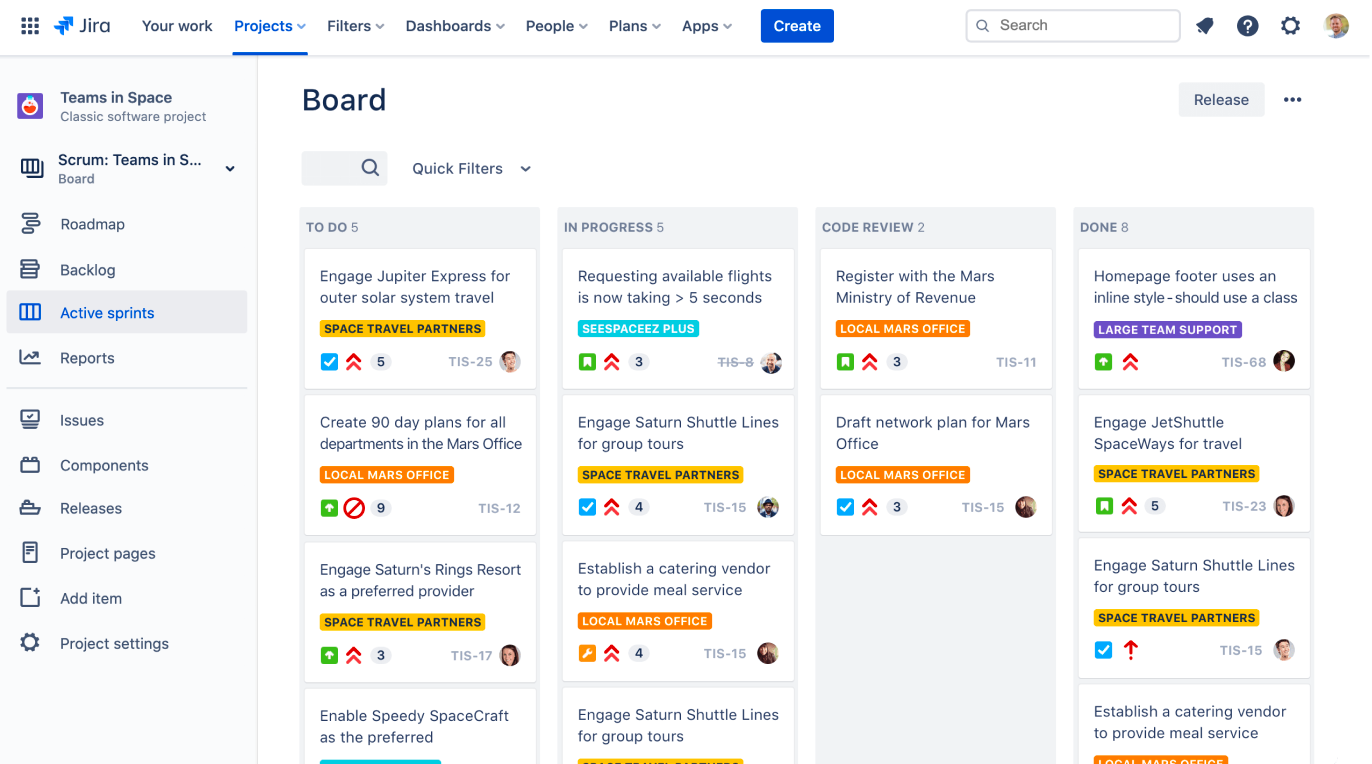
Have you ever wondered how software development teams manage to handle complex projects, meet tight deadlines and deliver high-quality software? The secret lies in Jira Software, a project management tool specifically designed for software teams.
Key features of Jira Software
Jira Software was developed to support agile methods and offers a flexible platform for planning, tracking and releasing software. With Jira Software, you can create user stories, plan sprints and distribute tasks within your software team. It offers multiple boards (Kanban & Agile) to track work, swimlanes to optimise the project view based on predefined filters, and agile reports to monitor project progress and address issues.
However, what sets Jira Software apart is its deep integration with other development platforms. It connects seamlessly with popular platforms such as Bitbucket and GitHub, allowing developers to view relevant Git commits, branches and pull requests directly in the context of a Jira Software story or bug.
The benefits of Jira Software
The benefits of Jira Software extend beyond the development team. By optimising the software development process, Jira shortens time to market and helps your business remain competitive. It facilitates collaboration by enabling team members to exchange information, discuss tasks, and resolve issues quickly. This not only improves software quality but also increases team productivity.
In addition, agile reports provide valuable insights into your team's performance and help you identify bottlenecks and make data-driven decisions. Whether you want to track the completion of a sprint with a burndown chart or understand your team's velocity over time, Jira Software provides the data you need to optimise your processes.
Is Jira Software the right choice for your team?
If your team is involved in software development and uses agile methods such as Scrum or Kanban, Jira is the ideal tool for you. It is designed to support the unique workflows of software teams, making it an excellent choice for developers, testers, and project managers in the technology industry. However, keep in mind that Jira's strength lies not only in its features but also in how well it integrates with your team's processes and workflows.
Bonus tip: If you use Jira Software, you can also use Jira Work Management projects.
Jira Service Management
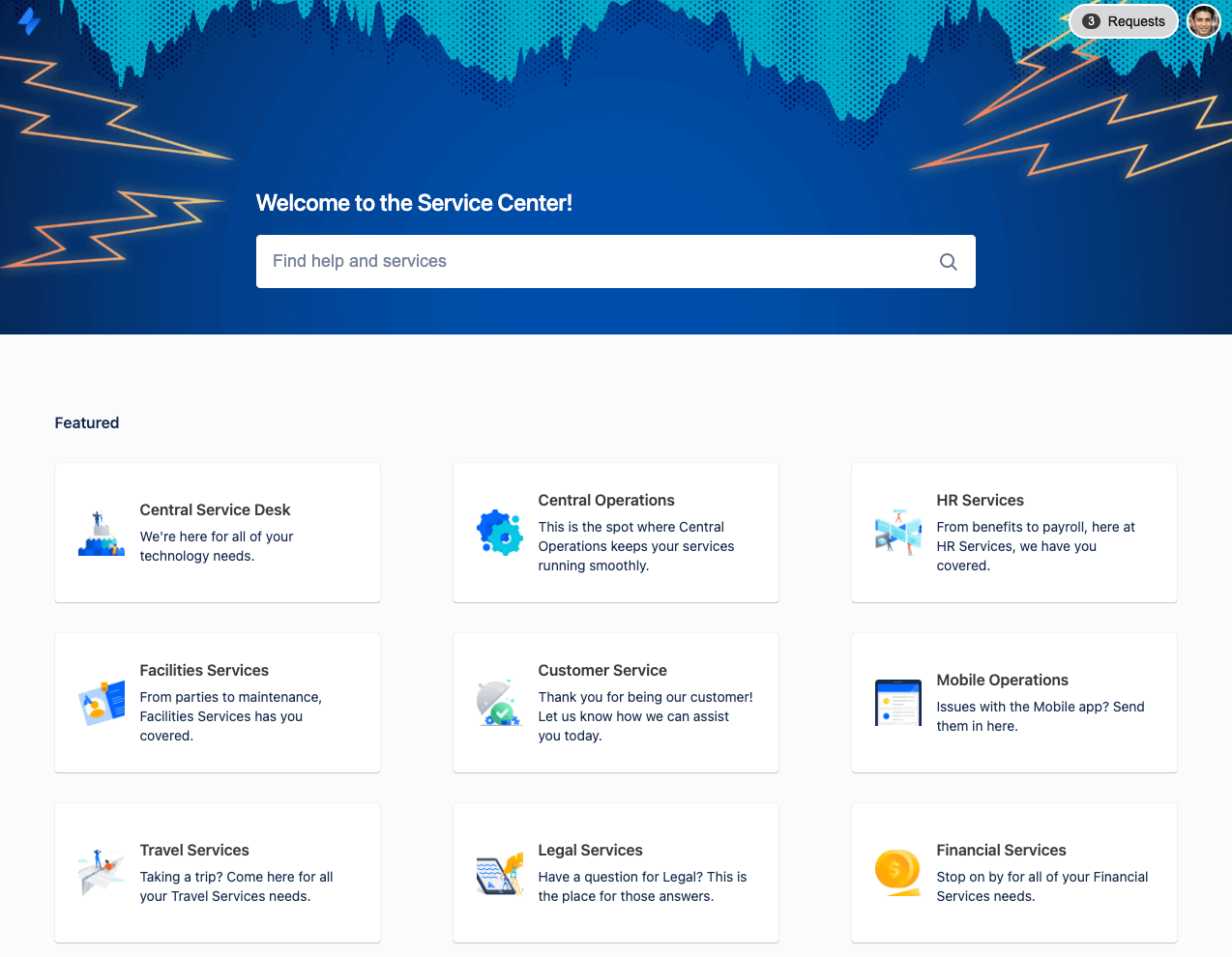
Next, we turn to Jira Service Management, a platform that optimises interaction between departments or between the service support team and customers.
Key features of Jira Service Management
Jira Service Management is an IT service management (ITSM) solution that combines IT support and project management. It features a user-friendly customer portal where users can submit requests, a powerful SLA tracking system, and a knowledge base for self-service support.
One of the standout features of Jira Service Management is its integrated ITIL-certified processes. ITIL, or Information Technology Infrastructure Library, is a collection of best practices for ITSM that focuses on aligning IT services with business requirements. With Jira Service Management, you can leverage these best practices to deliver high-quality IT services.
The benefits of Jira Service Management
Implementing Jira Service Management can lead to significant improvements in your IT service delivery. By providing a centralised platform for request management, it ensures that no request falls through the cracks. The SLA tracking system helps maintain high service quality, while the knowledge base reduces the load on your service desk by enabling users to resolve common issues themselves.
Furthermore, Jira Service Management facilitates cross-departmental collaboration between IT and other departments. This not only leads to faster problem resolution but also fosters a culture of transparency and collaboration within the organisation.
Another key benefit of Jira Service Management is asset management (database). This can also be used effectively internally.
Example: A new employee needs work equipment
The employee fills out a form, which creates a ticket. HR approves this ticket, and the laptop is shipped. Subsequently, the laptop is documented as an asset in JSM.
Integration with Confluence
Jira Service Management can be directly linked to a Confluence knowledge base. When employees submit a service request and the requested topic already exists in the knowledge base, the system provides articles from the knowledge base that address the issue based on the request. This allows service requests to often be resolved in advance without having to open a new ticket or involve a service agent.
Is Jira Service Management the right choice for your team?
If your team is responsible for delivering or supporting IT services, Jira Service Management is an indispensable tool. It was specifically developed for the needs of IT service teams and is therefore the ideal choice for IT managers, service desk agents, and anyone involved in delivering IT services. Whether you are a small business with a single IT support employee or a large enterprise with a dedicated IT department, Jira Service Management can transform the way you deliver IT services.
Jira Work Management
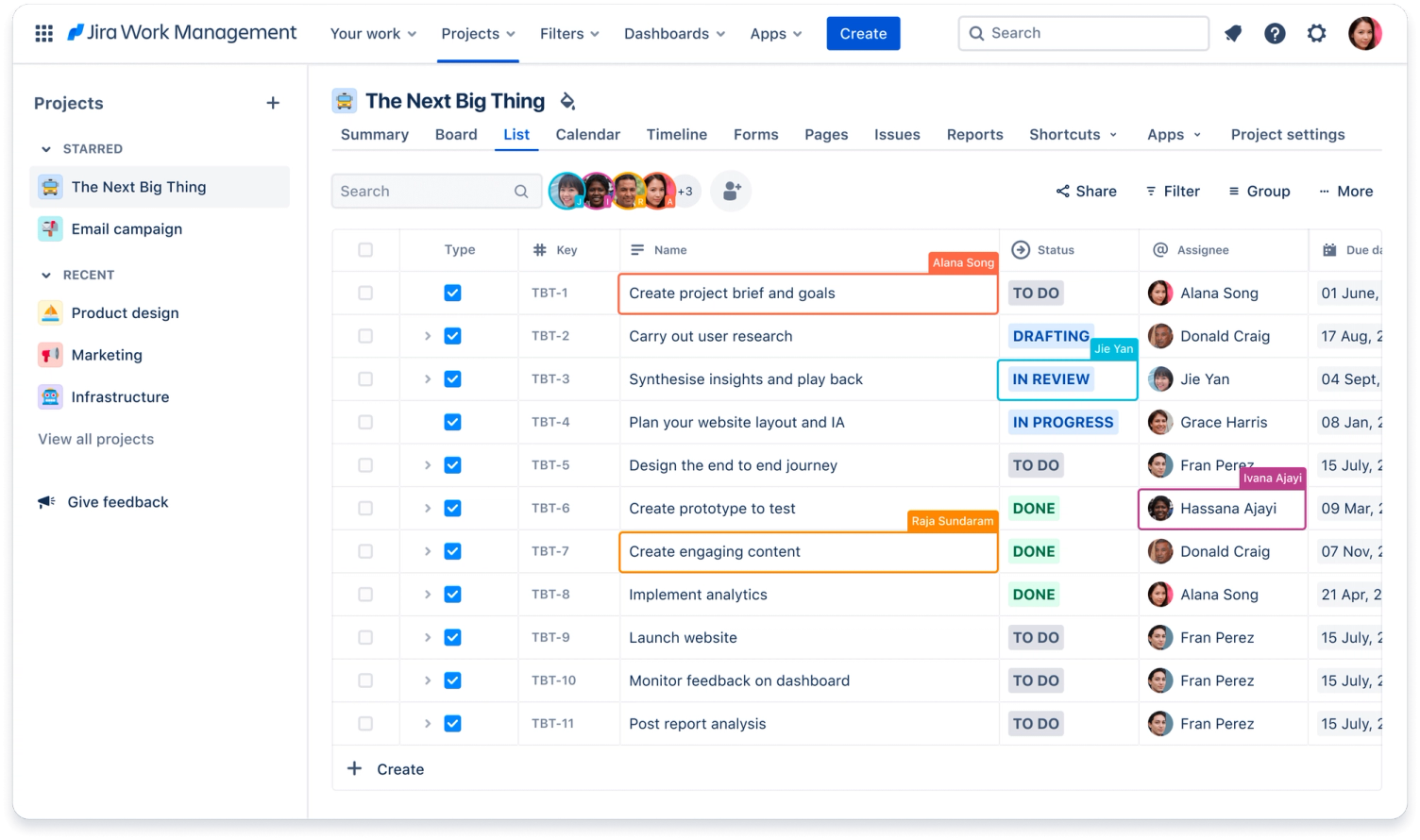
Jira Software and Jira Service Management primarily focus on software and IT teams. But what tools should other teams in an organisation use? This is where Jira Work Management comes into play.
Key features of Jira Work Management
Jira Work Management is a project management tool designed for business and operations teams. It offers a range of features, such as a work tracking board, an integrated calendar, forms, and pre-built project templates. Whether you are planning a marketing campaign, tracking HR tasks, or managing a finance project, Jira Work Management is the right tool for the job.
One of the unique features of Jira Work Management is its customisable workflows. You can tailor the workflows to your team's processes to ensure that the tool integrates seamlessly into your existing workflows.
The benefits of Jira Work Management
Jira Work Management can significantly boost your team's productivity. By providing a single platform for planning, tracking, and managing work, it eliminates the need for multiple tools, reduces complexity, and saves time. Customisable workflows ensure that the tool adapts to your team, not the other way around.
Furthermore, Jira Work Management promotes transparency and accountability within the team. Everyone has a clear overview of their tasks, deadlines, and responsibilities, leading to better coordination and collaboration.
Is Jira Work Management the right choice for your team?
If your team works in business areas such as HR, marketing, finance, or design, Jira Work Management is the right tool for you.
Atlassian developed it to support the specific workflows of business teams. Therefore, it is an excellent option for project managers, team leaders, and anyone involved in managing business projects. Jira Service Management is also used by teams outside of IT, such as in human resources and materials management.
In addition, Jira Work Management can be used with minimal configuration effort. However, the feature set of JWM is significantly more limited compared to Jira, which is why many of our customers tend to opt for Jira Software.
Take action: Speak to our Atlassian consultants
Now that you have gained a comprehensive understanding of the different Jira products, it is time to take action. Our Atlassian consultants are ready to help you choose the right Jira product for your team, support you with setup and customisation, and provide ongoing support to help you get the most out of your Jira tool. Do not hesitate - contact us today and revolutionise the way your team works!
A comparison: Jira Software vs Jira Service Management vs Jira Work Management
To conclude, let us take a look at a comparison table that highlights the key features and benefits of each Jira product:
| Jira Software | Jira Service Management | Jira Work Management | |
|---|---|---|---|
| Best for | Software development teams | IT service teams | Business and operations teams |
| Features | Agile boards, user stories, sprints, agile reports | Customer portal, queues, SLAs, forms | Work tracking board, calendar, forms, project templates |
| Business benefits | Efficient software development, improved collaboration, data-driven decisions | Streamlined IT service delivery, improved customer satisfaction, improved operational efficiency | Effective project management, improved team collaboration, on-time delivery of work |
| Teams | Developers, testers, project managers in the tech industry | IT managers, service desk agents, IT service delivery teams | Project managers, team leads, HR, marketing, finance, design, legal, sales and more |
Remember, the right Jira product for your team depends on your specific needs and workflows. By choosing the right tool, you can empower your team, optimise your workflows, and drive business success.