Recently, the Atlassian Community met at the High Velocity event in Sydney. At the event, leading minds from Atlassian presented groundbreaking new features in Jira Service Management (JSM) and announced new partnerships. JSM customers provided insights into how they use the Atlassian platform in their business, thereby underlining how Atlassian is revolutionizing service management. The overarching motto was: An end to poor service management.
In this article, we give you an overview of the most exciting news and new features in Jira Service Management.
Table of Contents
show
- The most important news & new features at a glance
- Transparency through a "Single-Source-of-Truth"
- Breaking down silos for more relaxed collaboration
- Quick and easy setup of various service desks
- Advanced working with Atlassian's Artificial Intelligence & Co.
- More news around Jira Service Management
- Future vision for service management
The most important news & new features at a glance
New partnership:
- New partnership with Airtrack enables comprehensive asset management in JSM
New features:
- Integration of Compass in JSM connects Dev and Ops data for full transparency
- Asset dashboard delivers meaningful insights
- Integration of DevSecOps tools helps create transparency over security vulnerabilities
- Integration of CI/CD tools supports seamless collaboration between Dev and Ops
- Customer support template optimizes support processes
- Single sign-on for customer accounts creates a seamless user experience
- Service management templates make teams more autonomous and faster
- Board view of tickets optimizes overview
- Dark Mode for eye-friendly work
- Virtual Agent answers questions with the help of artificial intelligence
- Agent Co-Pilot creates summaries and optimises communication
More news:
- New upper limit of 20,000 Agents per instance on JSM
- Increase of the upper limits of objects in the Asset and Configuration Database to 3 million
- Expansion of regional data storage: latest region in Canada
Transparency through a "Single-Source-of-Truth"
Integration of Atlassian's Compass and JSM
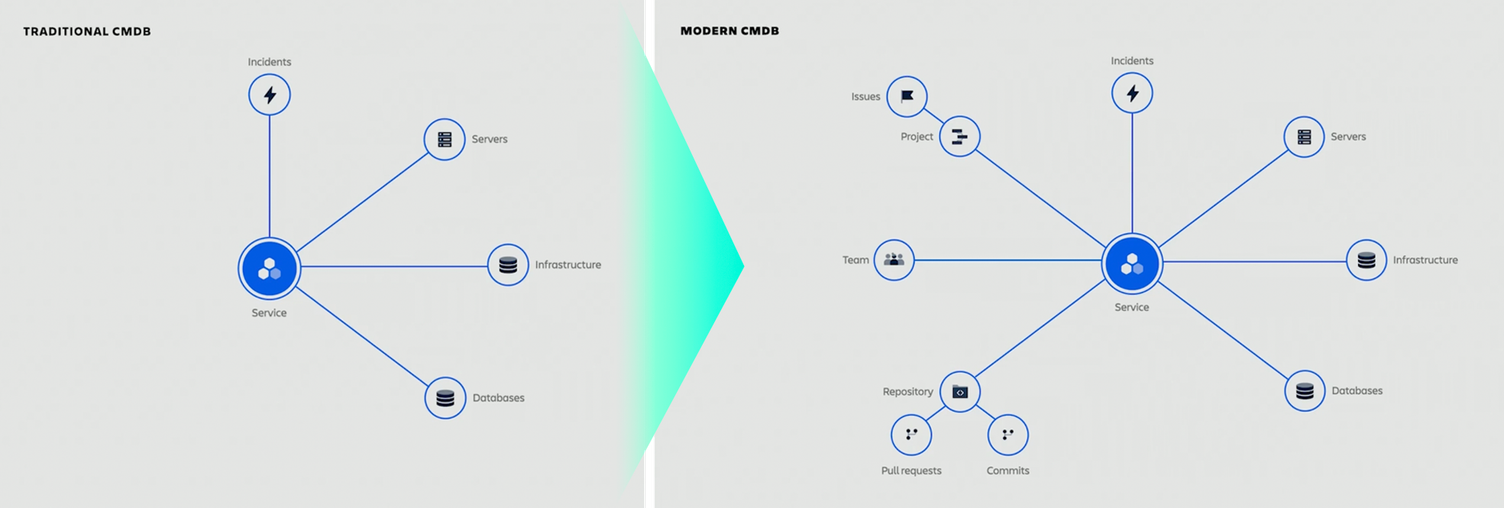
Compass is one of the latest additions to the Atlassian world. It is a kind of software catalogue that helps developers answer questions such as: How do I find a specific microservice? Who is the owner of it? How do I get help if something goes wrong? How do I know if it meets security and compliance requirements?
At the same time, Compass serves as a monitoring tool that supports DevOps teams in monitoring software components and reacting quickly when something goes awry.
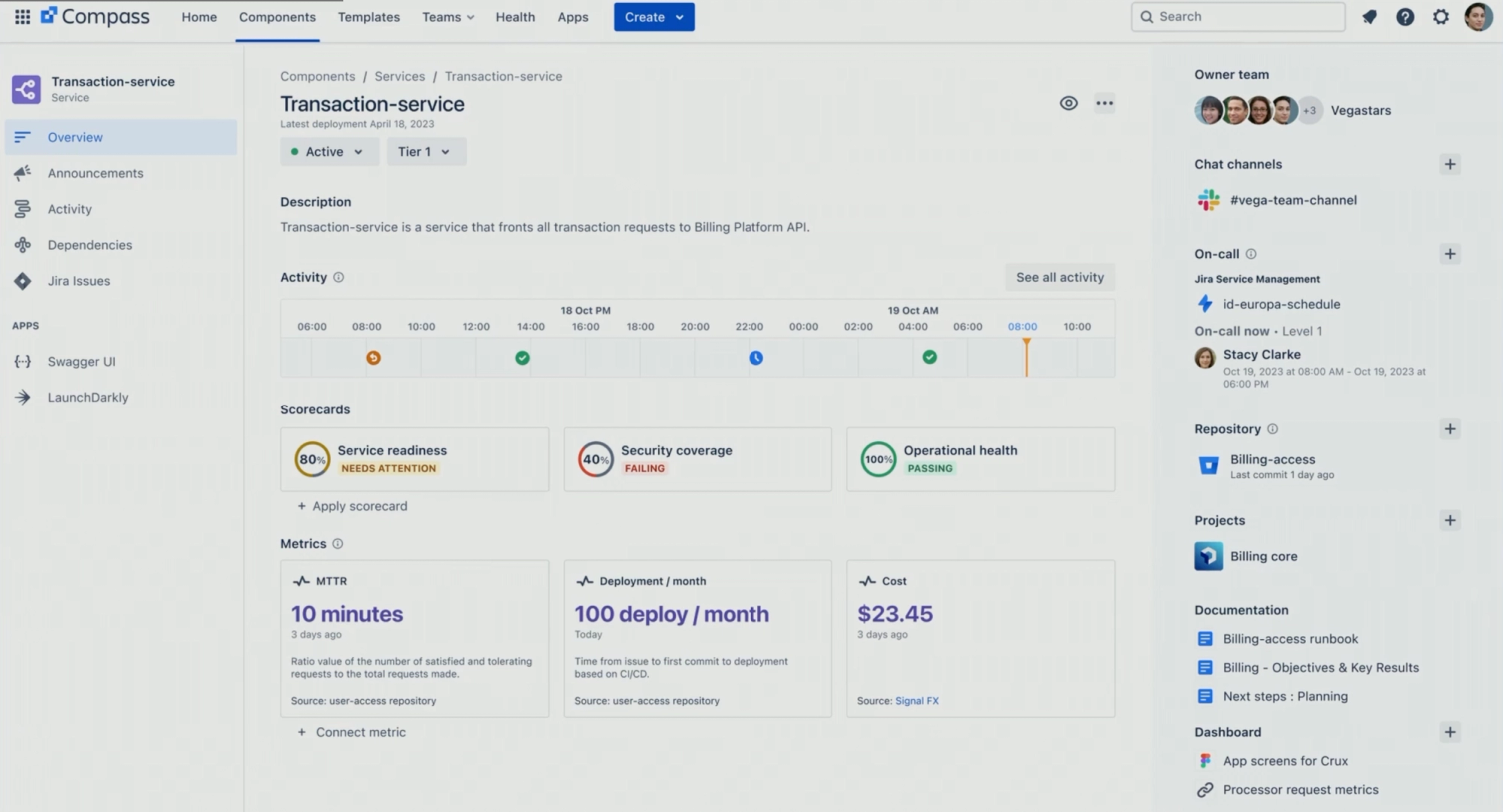
Through the integration into JSM, the IT team, which takes over the operational side of a service such as incident and change management, has a full overview of a service and its dependent components. For example, if there is a problem with one of the service components, IT can react and only roll out the change once the problem has been resolved.
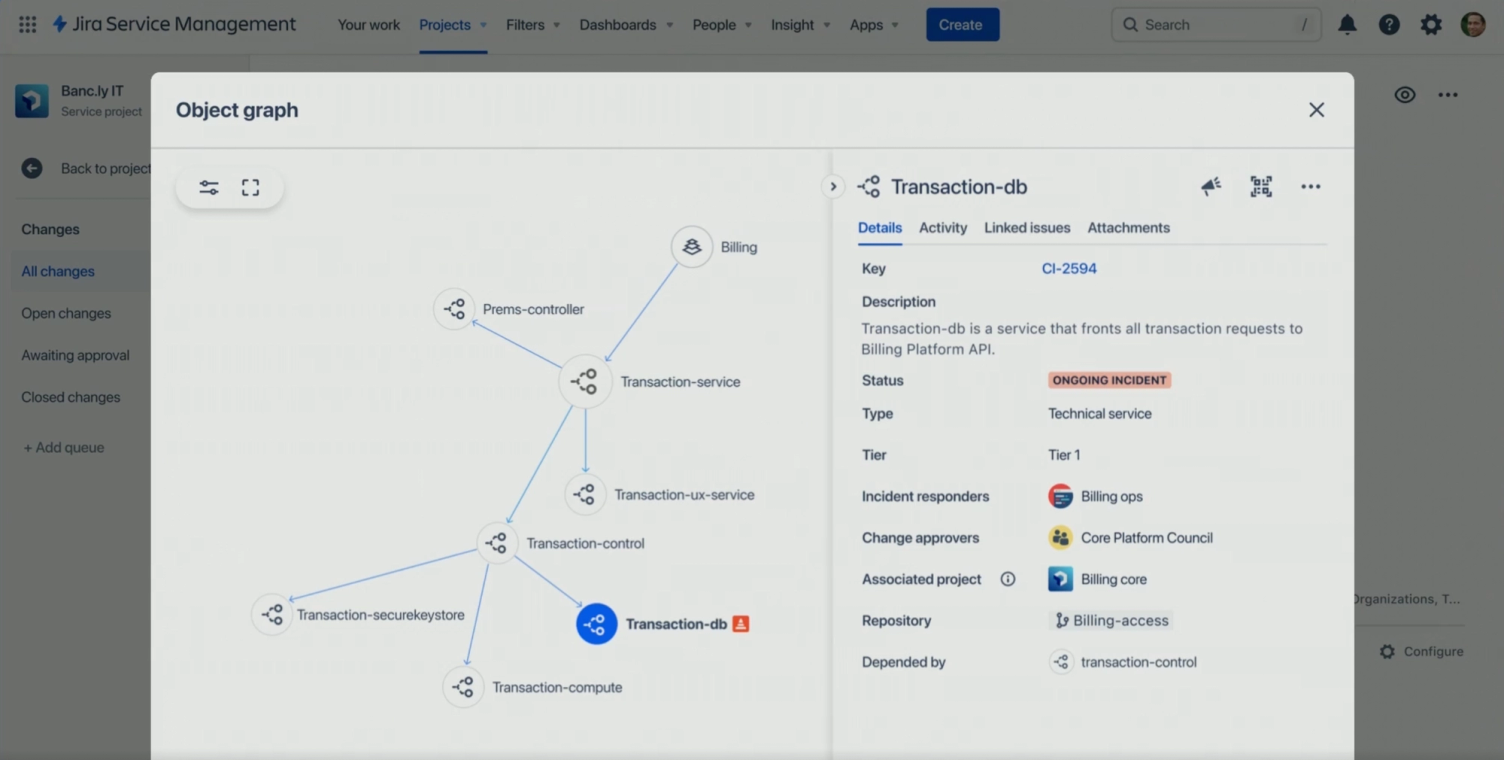
Through the combination of Compass and JSM, both developers and the IT team have visibility into the same data source, but with the information that is important for their respective job. This solves the major challenge of data currency in traditional CMDBs (Configuration Management Database) and extends the view to the developer perspective.
Comprehensive Asset Management with Airtrack and new Asset Dashboard
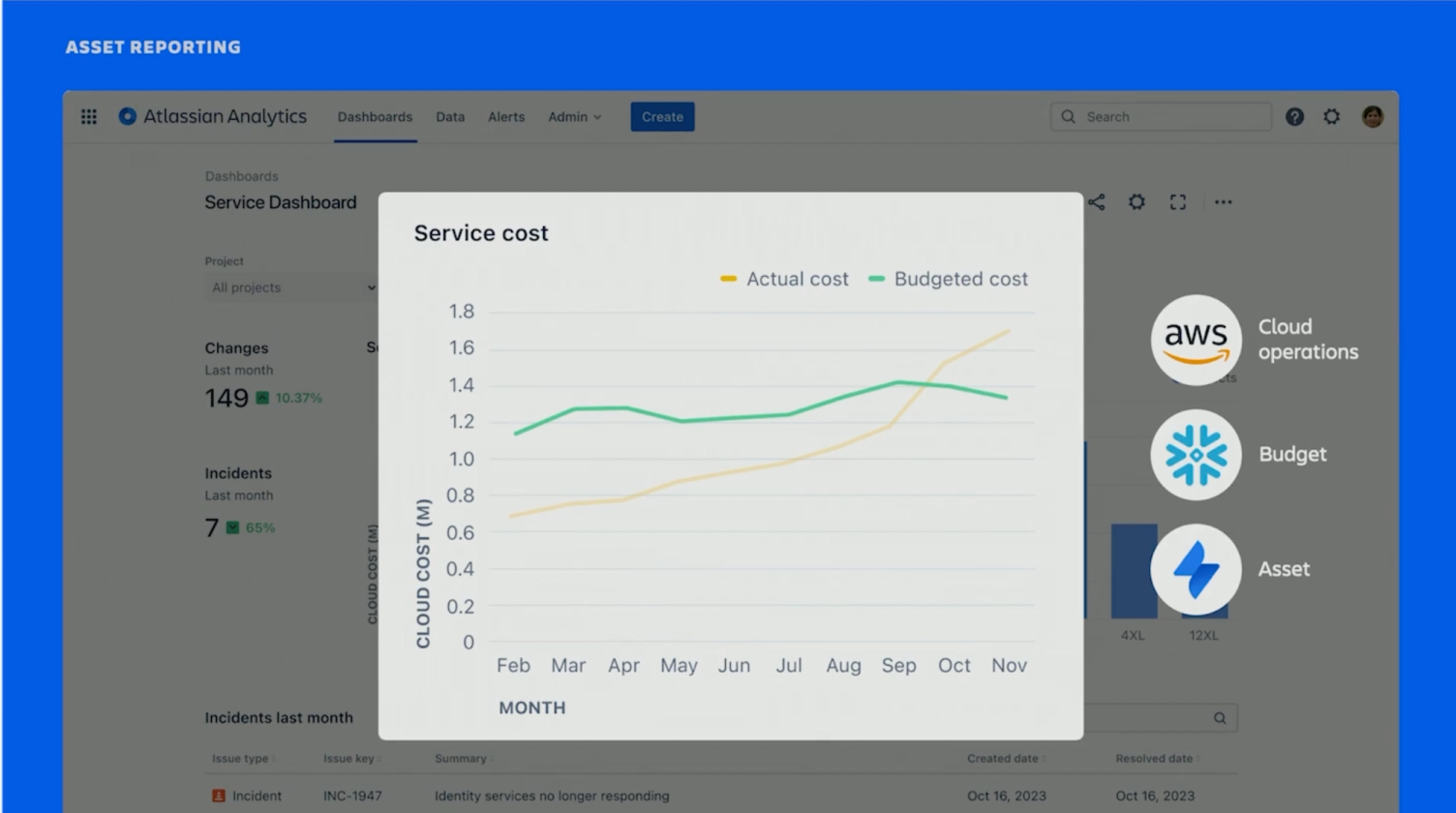
With the announcement that Airtrack now belongs to the Atlassian family, JSM users can now operate comprehensive asset management. Airtrack supports companies in consolidating and analysing various data sources and ensures that the data is correct, up-to-date and complete. It offers over 30 out-of-the-box integrations, enables data reconciliation (e.g. helps identify missing dependencies between services; discovers unmanaged machines) and processes data beyond IT (e.g. management of security, compliance, billing, forecasts, etc.).
The asset data is aggregated in a new Asset Dashboard in JSM, which provides meaningful insights and supports IT teams in their decision-making processes. Different reports can be created in the dashboard.
The extensive asset data is also available in Atlassian Analytics. This means it can also be combined with data from other Atlassian tools and third-party tools. This brings development, infrastructure & operations and business teams together on one platform and creates transparency across the entire company.
Breaking down silos for more relaxed collaboration
For developers and IT operations
Collaboration between developers and IT teams can be challenging. While developers want to quickly deliver new services and value, the IT team ensures that these do not pose operational risks. New integration options for developer tools in Jira Service Management aim to eliminate these friction points and ensure seamless collaboration.
The integration of DevSecOpstools in Jira enables better risk management. This makes all security vulnerabilities within a sprint visible. Additionally, automation rules can be created, which automatically create tasks in Jira as soon as a security vulnerability is identified. This ensures that all risks are addressed before the service is rolled out.
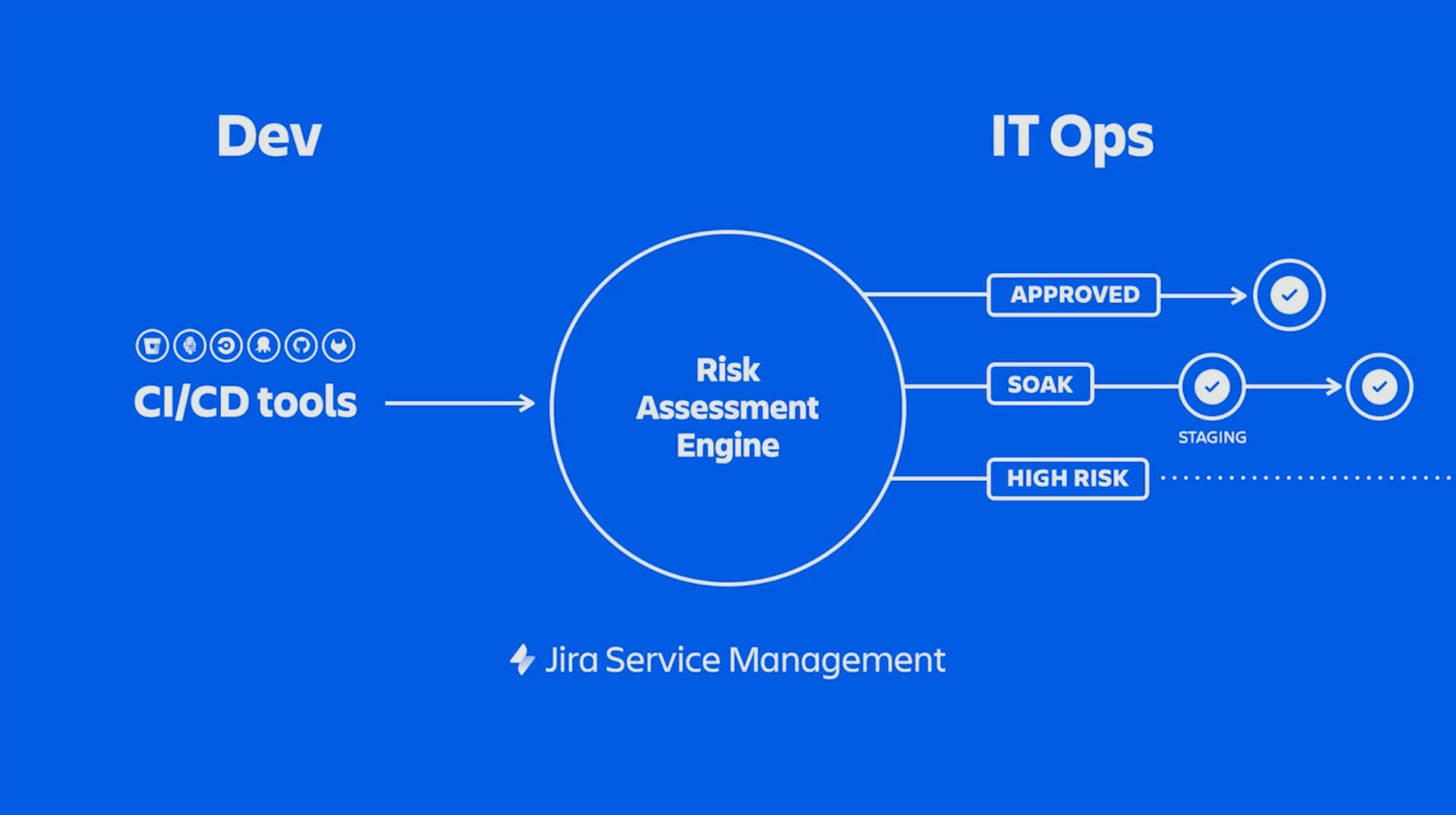
Through the integration of common CI/CD tools, development teams can create change requests without having to leave the tools they use daily. The change request is automatically created in JSM and is thus directly accessible to the IT team.
Ultimately, an integrated process is created from development, through risk assessment, to the approval and implementation of changes. High-risk services can be sent back to the development team in the CI/CD tool for review before they are implemented in the production system.
Developers also receive an overview of the status of their services with the new Release Hub in Jira, and automatic notifications inform them when a service has been rolled out.
For customer support and development teams
A new JSM template for customer support offers a convenient overview of all customer-relevant data and processes.
It also includes a feature that supports the seamless escalation process and improves collaboration between development teams and support teams. Support staff can escalate customer issues directly in JSM, and the tickets are created directly as bugs in Jira Software. This allows developers to quickly identify the impact of the bug they are working on on customers. At the same time, the support team has a central overview of all escalated tickets.
For customer support and customers
For seamless communication and ticket creation, a Single Sign-On (SSO) solution can be made available to customers. Jira Service Management now enables a connection with a separate SSO provider such as Microsoft Azure AD, Google Cloud Identity, etc.
Quick and easy setup of various service desks
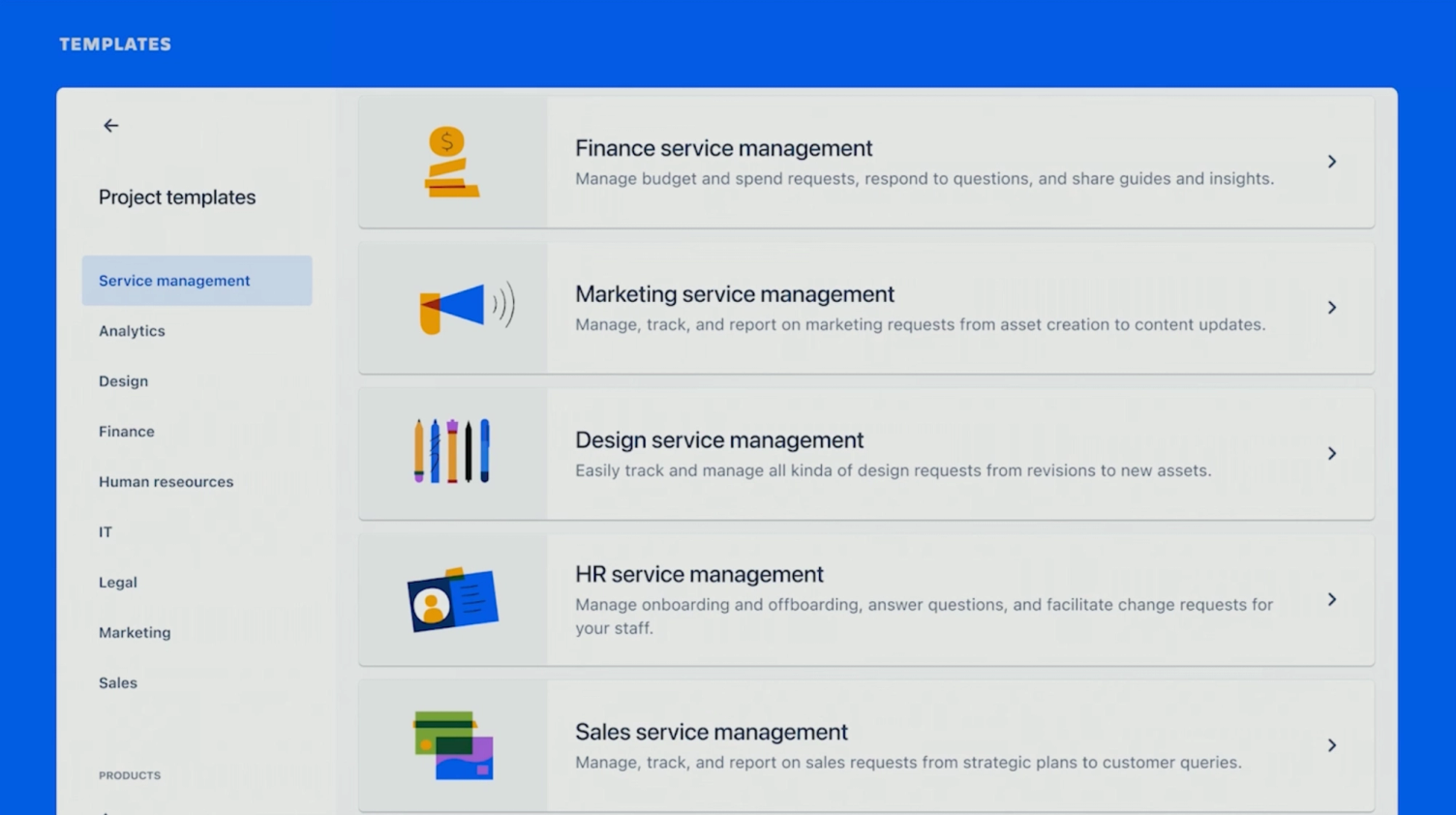
New service management templates for various business areas ensure that teams can quickly and easily create their own service desk. They include pre-configured request forms and workflows that can be used directly.
The customization options for service management templates have also been improved and simplified. Here, the user can also choose from several best practice templates for forms or create their own forms.
This allows teams to act more autonomously and quickly without having to involve a system administrator for setup and changes.
Advanced working with Atlassian's Artificial Intelligence & Co.
New features for a more user-friendly application
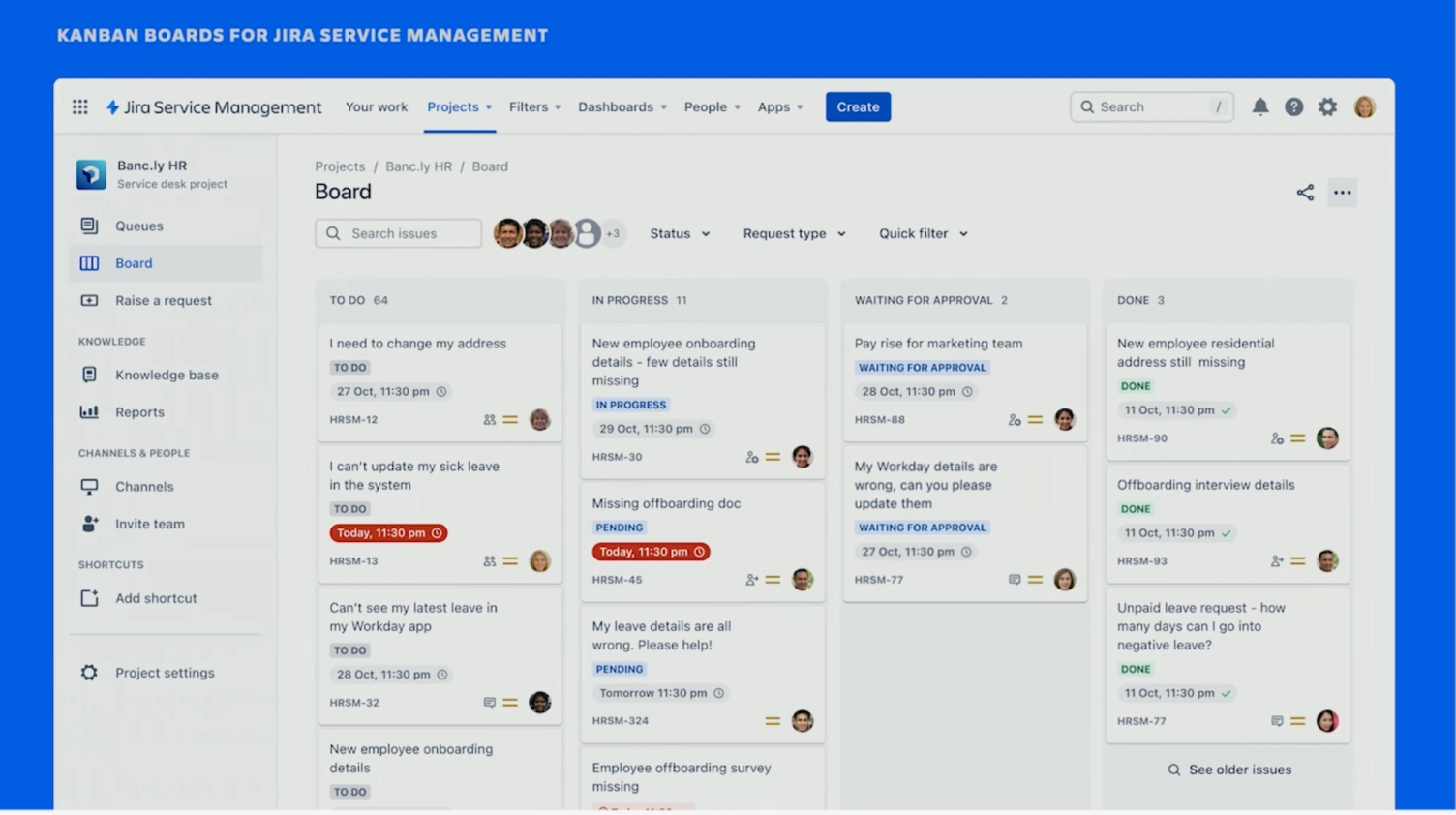
Under this motto, JSM now offers a much-requested feature: The view of tickets in a board view facilitates the overview and offers the usual drag-and-drop options.
Another new feature is that, for example, night owls who are still working on support tickets late into the night can now also use JSM in a more eye-friendly Dark Mode.
Integrated artificial intelligence (AI) that eases the daily workload
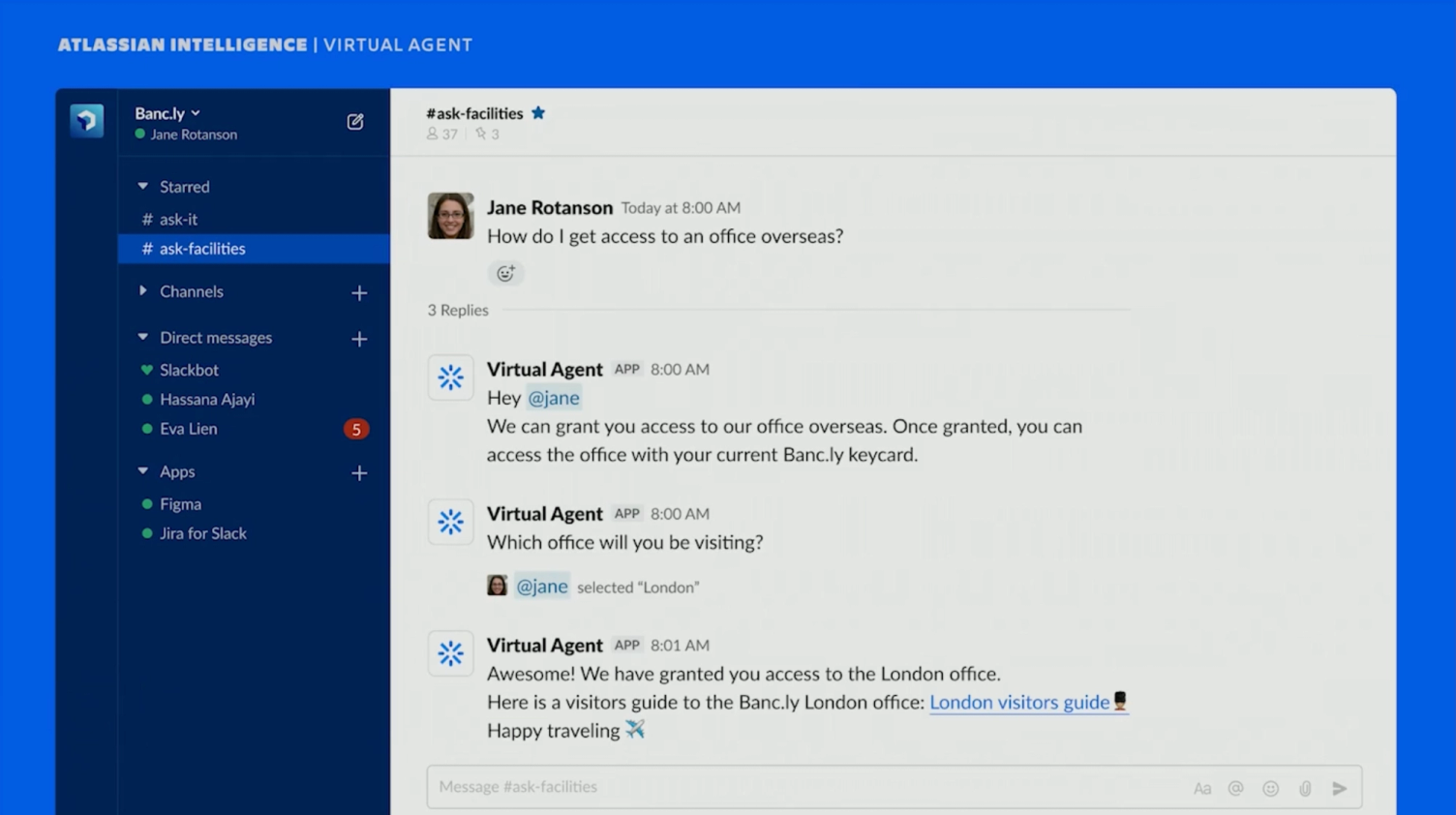
With the vision of freeing employees from repetitive tasks and scaling service desks, the Virtual Agent is now available in JSM. The Virtual Agent is capable of asking a logical follow-up question to an employee's query in order to provide the most specific answer possible for the employee.
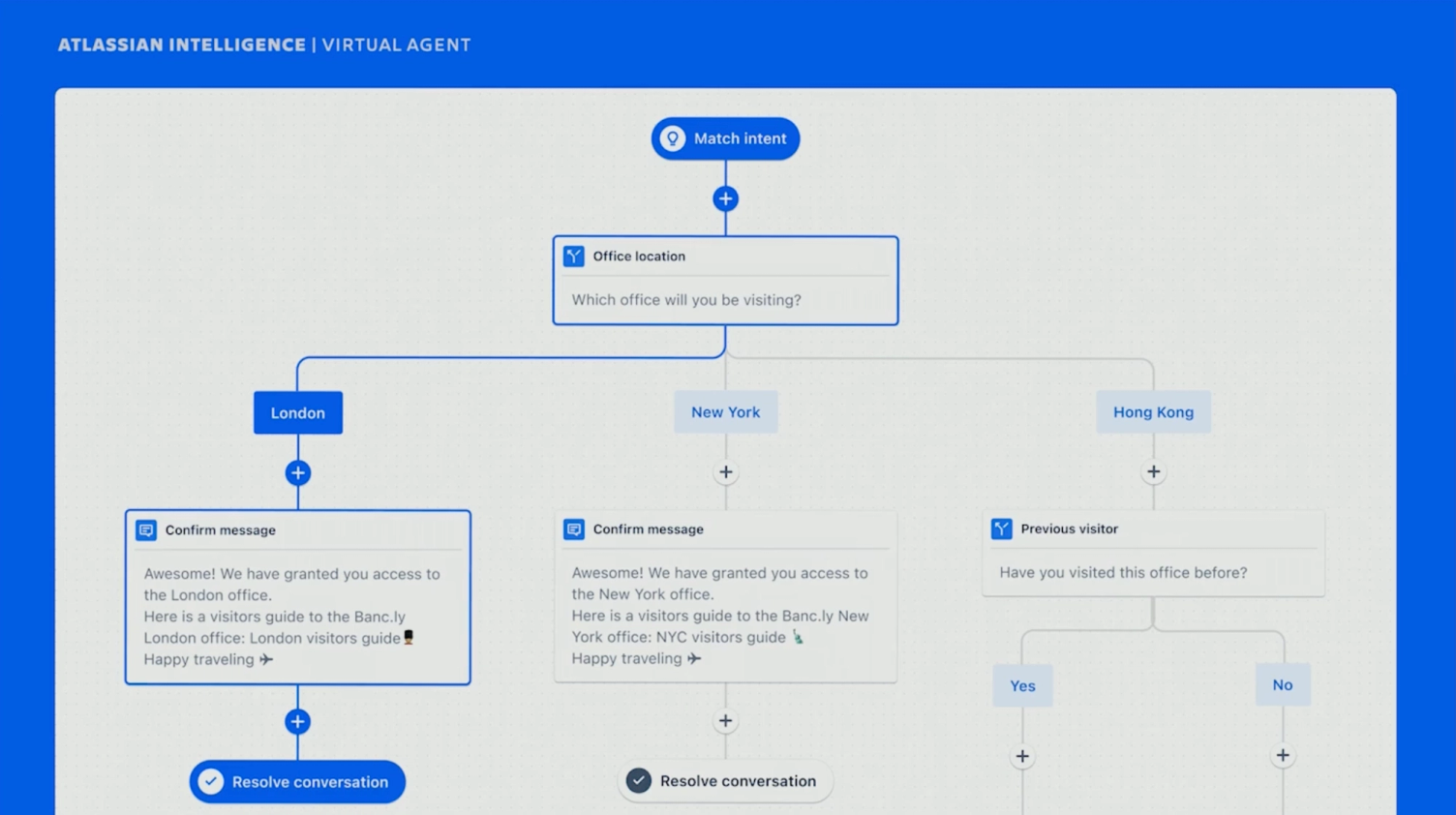
The unique advantage of the Virtual Agent is that it is designed so that anyone can set it up themselves. This is enabled by an easy-to-use no-code interface, where the employee can determine the workflow that a request goes through. This allows the agent to be set up within hours, rather than spending days and weeks on it.
Similarly, the features of the Agent Co-Pilot (powered by Atlassian Intelligence) will soon be rolled out. This is intended to particularly improve service management quality, which often suffers when different support staff take turns working on a ticket. The challenge for employees in this regard is to bring themselves up to speed on the current state of information each time, which can be very time-consuming.
For this purpose, the Co-Pilot Agent provides a short and concise summary of all processes already documented in this ticket with a single click, bringing the support staff up to speed in the shortest possible time.
The agent also assists in drafting messages to make communication as efficient and clear as possible. It rewrites written texts so that they are clear and professional and provide the necessary context for the recipient.
More news around Jira Service Management
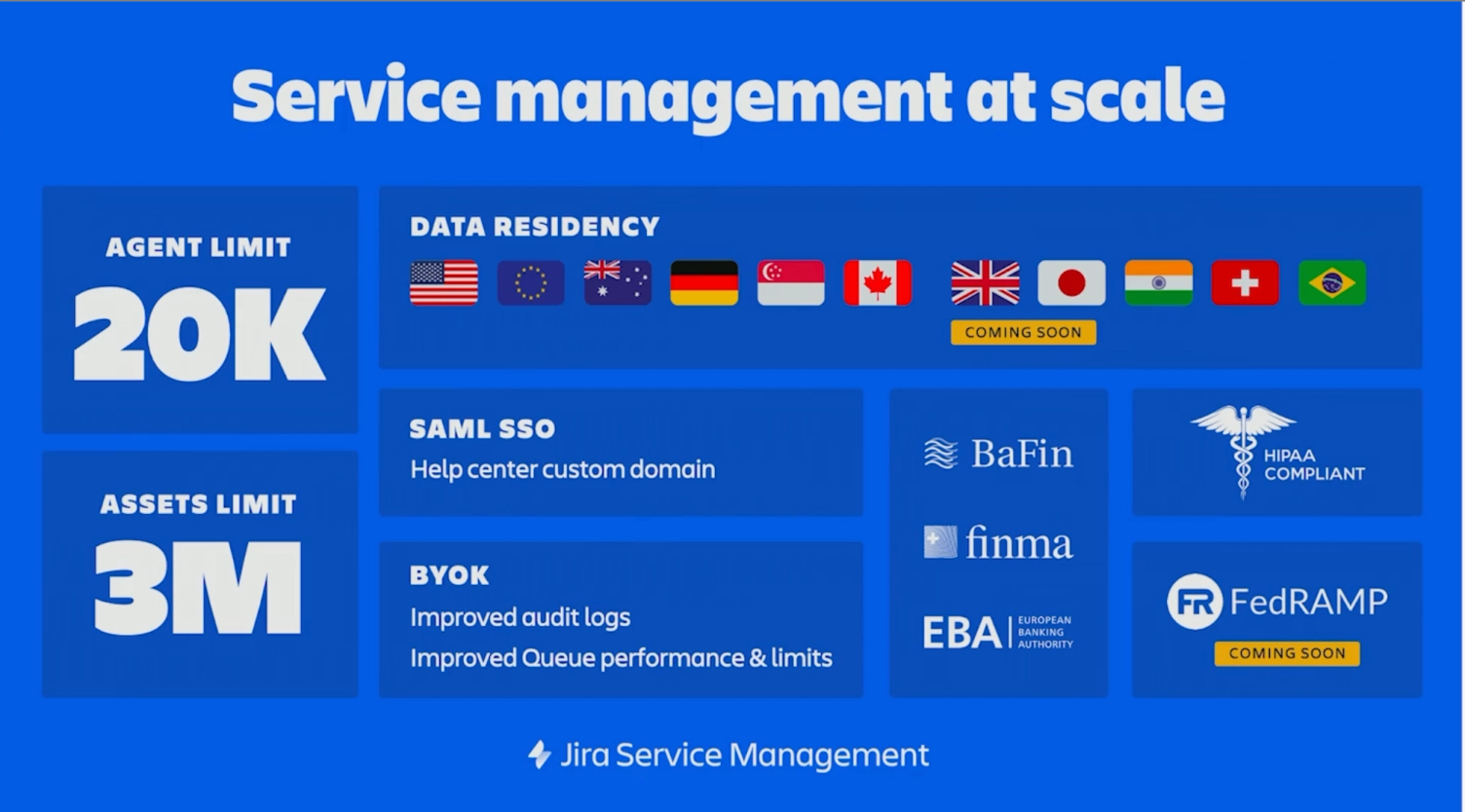
Further news from the High Velocity Event was that the limits were raised as follows:
- for Agents per JSM instance to 20,000 Agents
- as well as for objects in the asset and configuration database to 3 million.
Regional data storage has also been extended to the Canada region. The following figure summarizes these updates again.
Future vision for service management
Finally, Atlassian's vision for its service management platform was emphasized: No matter how many different technologies, teams, and systems are in use in the service area - Jira Service Management is intended to be the central platform connected to all systems and serves as the control center to coordinate and resolve requests, regardless of which system they are resolved in.
The artificial intelligence also supports delivering fast, clear, and consistent answers. It is also connected to all systems, collects information there, and provides it in a short and concise summary.
If you would like to watch the keynote and sessions of High Velocity in Sydney, you can find the video recordings here: https://events.atlassian.com/highvelocity/