As described in Part 1, the deployment of Atlassian software with AWS and Spinnaker offers several essential benefits. The second part focuses on how these can be deployed using YAML files. These contain the configuration of applications.
Deployment based on YAML files
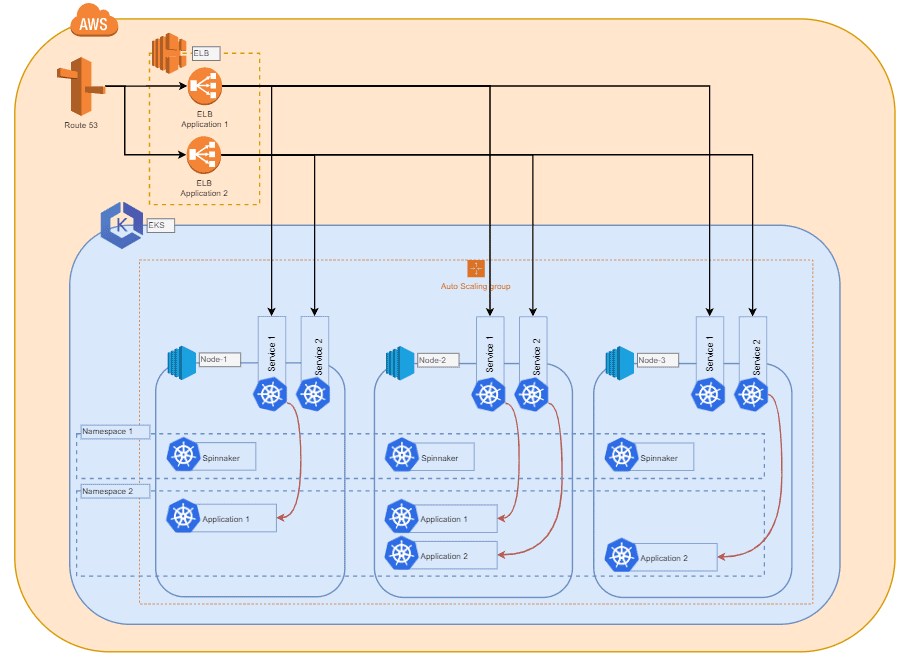
Deployments are carried out using YAML files, which define the configuration of applications, services, and more for Kubernetes. These should include, on the one hand, a name and a definition of what you want to deploy, and, on the other hand, the number of replicas. For example, if we want to deploy a fail-safe application on Kubernetes, we would use 2 components.
1. The application
First, the application itself. As we want to make it fault-tolerant, we would deploy it in the form of a "ReplicaSet" with 3 replicas. Kubernetes then begins deploying 3 Pods with the described application and distributes them across the compute nodes. This is done based on hardware constraints and tags.
2. The service
The second component is a "Service". You can think of it as a load balancer within the cluster. In addition, this service now ensures load balancing across all three of our Pods. This is done based on specific tags that we have specified in the deployment YAML. Depending on the service type, EKS can create an AWS load balancer with a public domain name. This allows us to access our application without manual network adjustments. Furthermore, it is also possible to deploy Ingress controllers and make our application accessible with other tools.
Using Spinnaker
Anyone with access to the cluster can now manually deploy applications. Therefore, we develop a method to make all deployments transparent for everyone who works with them and to channel deployments through a standardised and reliable path.
This is where Spinnaker and its pipelines come into play. They give us an overview of the applications running in the cluster. In addition, we can easily obtain further information about deployments, such as deployment versions, pipeline runs, or the status of the load balancer. Spinnaker itself is deployed into the cluster. As a result, Spinnaker benefits from the same fault tolerance that Kubernetes provides for all applications under its control.
DevOps helps your company deliver software solutions more efficiently and effectively and convince your customers through constant updates. Learn more about DevOps.
Infrastructure from microservices
The idea here is to have an infrastructure consisting of containerised microservices. Each microservice/application is built from a dedicated repository, and after changes have been made, the application is built, which is then used to build a new Docker image. This image is pushed to a private Docker registry.
Spinnaker Pipeline
This triggers a Spinnaker pipeline, which now deploys the modified container with the provided configuration as a new version into the cluster and modifies the service load balancer so that it directs traffic only to the newly deployed version. If this version does not pass the built-in checks, the change is rolled back and the old version is reactivated via the service load balancer.
Ideally, the Spinnaker pipeline first deploys all containers in a Dev/Stage environment to check for errors before the changes are deployed to the Master/Production environment. A failed update can thereby be rolled back automatically and also manually via the Spinnaker web UI.
You would like to learn more about Atlassian Hosting on AWS? Here is the link to our Cloud Hosting Services
← Back to Part 1: Infrastructure
Continue to Part 3: Project and User Management with Kubernetes →