Information overload, complex processes, and constant overwhelm. But what if it didn't have to be that way? What if you could automate your processes so that they serve you – and not the other way around? Let's look at the problem of unoptimised processes together and solve it step by step. This is where AI-driven business process automation comes into play.
Information overload and complexity: The hidden productivity killer
Your working day begins and ends in chaos. Constantly popping-up messages, endless documentation requirements, and the impossibility of finding what really matters overwhelm you and your team. This information overload paralyses rather than inspires. The sheer abundance of data makes it difficult to keep your focus on what is essential.
Even worse: the processes that are supposed to help structure your daily life are often too rigid and complex. Instead of making your work easier, you feel like a servant to the processes – not the other way around. Non-value-adding activities pile up, whether it's manually filling out forms or the endless search for information.
The peak of frustration? The emergence of so-called workarounds. Because processes are so inflexible, employees develop their own solutions, which often make collaboration within the company more difficult rather than improving it. The result? Lack of transparency and a lot of wasted time.
Why the problem is so serious
Let's be honest: if you don't address these problems, you will pay a high price in the long run. Information overload can lead to burnout if employees constantly try to swim in an endless sea of data. The feeling of being at the mercy of processes robs motivation and leads to declining productivity. Non-value-adding work can mean the difference between a successful project completion and a defeat. And finally, opaque workarounds can lead to important information being lost – or even processed multiple times without anyone having the full picture.
But the worst of it is: every day you ignore these problems is a lost day. Time is the only resource you cannot get back. But how can we solve this?
4 Use Cases: Business process automation with AI (Rovo)
AI automation is the key to greater efficiency and success. Download our detailed case studies now and discover how you can automate your processes in just a few steps with Atlassian Rovo. Or contact us directly – together we will start automating your first processes. Take the chance to take your business to the next level!
Business process automation with AI: The way out of chaos
The good news: business process automation with AI can help you solve these problems. And no, we're not talking about fancy gimmicks here, but about real, feasible steps that make your company more efficient and your work more meaningful.
Step 1: Analyze your processes – Where does it hurt?
Before you automate anything, the first step is to analyze your existing processes. Take the time to consider which processes truly cause the most pain. Which tasks are repetitive? Which make you feel like a servant to the process? Document these processes.
Example: The sick leave process is an overloaded monster, where employees have to report to their supervisor, cancel meetings, and create an absence note.
Step 2: Small but effective steps towards automation
It is not about automating everything at once. The "Pareto 20/80" approach is ideal here: automate 20% of the processes that reduce 80% of the workload. This means you identify the recurring tasks that consume the most time.
Example: Instead of manually entering sick leave into your internal company system, you could use AI and automations that automatically create the absence note based on a short message, cancel meetings in your calendar, and enter relevant information into the system.
Step 3: Digital assistants as a game-changer
Another solution is the use of digital assistants. These can help employees handle complex or rarely used processes more easily. Digital assistants are particularly valuable when onboarding new team members.
Example: Instead of manually training new employees at every step, a digital assistant can explain basic tasks – such as how to submit vacation requests or where to find important information – and help make the first days stress-free.
Step 4: Automate interfaces and cross-departmental processes
Automation does not stop at departmental boundaries. In many companies, high efforts arise at the interfaces between departments due to different processes and required information. These handovers are often error-prone and lack transparency.
Example: Imagine you have a sales department that enters new deals into a CRM system. With an automated interface, sales can not only enter the deal but also simultaneously create a new project ticket in Jira, thereby immediately involving marketing and project teams.
Step 5: Save valuable time by automating information search
The search for information is one of the most time-consuming tasks in everyday life. AI can be particularly helpful here. Imagine you could simply ask: "Which projects are scheduled for this quarter?" and the AI compiles all relevant information from your systems.
Example: A query to an AI such as "Which projects are in the green this month?" can provide you with a summary of project data without you having to manually click through each individual system.
Step 6: Automated escalation and problem detection
A major problem in many companies is that emerging errors and issues are detected too late. Automated systems can help here by intervening early to prevent damage.
Example: A system that detects when a task has been left unprocessed for too long could automatically trigger an escalation and notify the responsible parties.
Step 7: Holistic integration and the focus on added value
The goal of automation should not only be to save time, but also to relieve your employees, enabling them to focus on value-adding tasks.
Example: Automating communication regarding project changes. When a new project is started, the AI could automatically inform the relevant people, link the corresponding documents, and display progress in real time.
Suitable tools for automating business processes with AI
When it comes to efficiently automating business processes, numerous tools are available. A standout example in the Atlassian ecosystem is Rovo. Rovo is an AI-powered digital assistant specifically designed to automate routine tasks and make daily life easier for both employees and support teams. However, Rovo is not the only tool that can be helpful here:
Rovo and comparable automation tools
Rovo is distinguished by its seamless integration into Atlassian tools such as Jira and Confluence. It supports the automation of recurring tasks, such as creating and assigning tickets or answering frequent inquiries. The ability to proactively detect issues and contribute to their escalation makes Rovo a comprehensive solution for process automation. You can find further insights on Rovo here: What is Atlassian Rovo and what can I do with it.
Other automation tools
- Loom: A tool that transcribes meetings in real time and extracts key information. Ideal for automating meetings and increasing productivity.
- Workato: This platform connects apps and automates workflows at enterprise level. Particularly suitable for companies that require comprehensive integration and automation.
- Airtable Automations: Offers a user-friendly way to automate workflows within Airtable databases. Perfect for teams that already use Airtable and want to make their data processes more efficient.
- Make: This platform offers powerful automation options, particularly for complex data processing and workflows that require flexible connections between different apps.
Summary: Your path to efficient automation with AI
Automating business processes with AI is not a panacea. It is your tool to focus on what matters. To prevent burnout, increase employee satisfaction, and restore productive flow in the company.
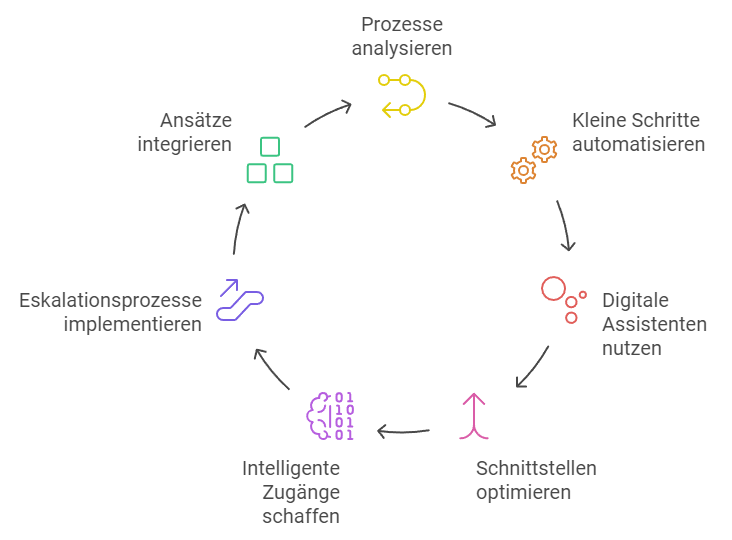
The steps to a solution are simple:
- Analyse the processes and identify the real pain points.
- First, automate the small steps within a process that consume a lot of time but have a significant impact.
- Use digital assistants to relieve employees.
- Optimise the interfaces between departments.
- Create smart information access through AIs.
- Implement automated escalation processes.
- Integrate all these approaches for a holistic benefit.
If you follow these steps, you will quickly notice how your daily work life transforms for the better. Automation of business processes with AI is no longer a futuristic concept, but a feasible way to increase the efficiency of your company.

4 Use Cases: Business process automation with AI (Rovo)
AI automation is the key to greater efficiency and success. Download our detailed case studies now and discover how you can automate your processes in just a few steps with Atlassian Rovo. Or contact us directly – together we will start automating your first processes. Take the chance to take your business to the next level!