There are numerous Atlassian hosting options. Server, Data Center, or directly in the Atlassian Cloud. One of these options is to host Atlassian software directly on your own server or with AWS / Azure (cloud provider).
In this short article, you will find all information and requirements for hosting Atlassian software.
Atlassian Hosting: Prerequisites
An official domain with a DNS server where entries can be added and resolved.
DNS entries pointing to the external IP of the server on which the Atlassian application is to run.
If Route 53 is used, we can generate wildcard certificates for the entire domain using certbot and letsencrypt.
Application server
Server provisioning
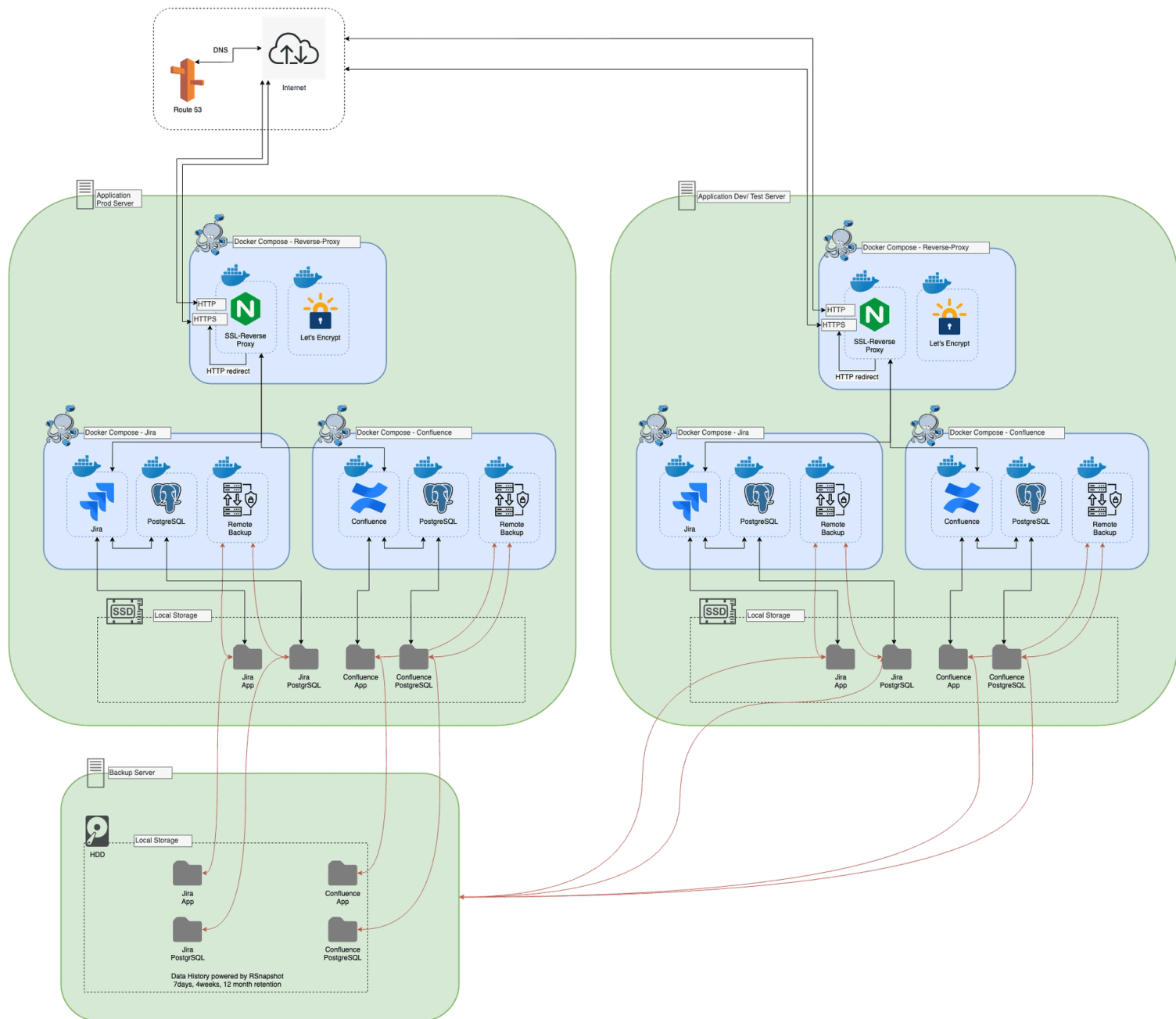
As an application server, we typically use Ubuntu and run Ansible to configure it. Ansible then performs some basic configurations and installs required software, such as Docker on the host. Some Docker applications are also deployed on a host, such as the reverse proxy.
Reverse proxy
As a reverse proxy, we use the Docker image xalt/nginx. This can attach to the Docker socket and is therefore able to read which Docker containers are running on the host. If an application has set certain parameters, the Nginx configuration is automatically changed and reloaded, and upstream and server configurations are created for the specified virtual hostnames and ports. If the hostname matches an available SSL certificate, an SSL listener for this application is also configured. The reverse proxy can serve content over 80 (http) and 443 (https); these ports are mounted to host ports 80 and 443.
Managed Atlassian hosting: simplify running Confluence, Jira and Bitbucket
A sidecar container is provided, the Let's Encrypt helper. This container also has read access to the Docker socket, and if a container provides Let's Encrypt parameters, it initiates a Let's Encrypt certificate challenge and stores the certificates so that the reverse proxy container can use them for https connections.
Docker application
All Docker applications are described in a docker-compose.yml file, which is provided by Ansible. JIRA/ Confluence and the PostgreSQL database have their home directory mounted in separate directories at the same level as the docker-compose.yml. In this way, the application configuration and application data are in the same area and can be easily maintained.
JIRA/ Confluence
This Docker container runs a Tomcat with the JIRA application. The Tomcat connector must be correctly configured via the container's environment variables. The same applies to application monitoring via NewRelic. The heap parameters can be configured in the same way, and of course the reverse proxy parameters must be set, as well as the Letsencrypt parameters, if required.
For test systems, we have implemented a few additional features to enable the restoration of persistent home data via ssh rsync and the modification of the database with Liquibase. For example, the base URL or application links can be changed.
PostgreSQL
We typically use a PostgreSQL container and spawn it in a separate, application-specific Docker network under the DNS name "db", which is only accessible to the containers specified in this docker-compose.yml file. The username, password, and database are specified as environment parameters of the container. The database for JIRA/ Confluence can also be MySQL or OracleSQL, but we have chosen PostgreSQL for compatibility reasons.
For test systems, we have implemented a few additional features to enable the restoration of persistent home data via ssh rsync.
Backup
This container essentially runs a cron job that shuts down the JIRA/Confluence and PostgreSQL containers and transfers the persistent home folders to the backup server via rsync. This container is also configured by several environment parameters, such as the cron job time, the name of the backup server, and it also requires some mount points, such as the Docker socket, to shut down and start Docker containers from within a Docker container. Additionally, further mounts are required to locate where the data to be backed up is located.
Web request
When accessing a Docker application, the user typically enters a DNS name into the browser. The IP attempts to be resolved via a DNS query to R53. The response is usually an A record pointing to the server on which the application is running. The browser establishes a connection to port 80 of the application server. There, the Docker proxy forwards the requests to the Nginx reverse proxy, which redirects to https if a valid certificate exists for the virtual hostname of the application. Once this directive has been executed by the browser, the request is accepted on port 443 of the application server. It goes to the reverse proxy, which then sends it to the configured upstream, the Atlassian application, and delivers the response to the requesting browser to load further resources and render the downloaded webpage in the en.
Atlassian Hosting: Backup Server
This host is typically provisioned with large storage to store the application data of multiple Docker applications. It is also provisioned via Ansible.
By default, Docker is not installed here; instead, rsync and rsnapshot are installed, which are the most important components of our backup concept. Rsync is used for data transfer from host to host, but also for rsnapshot.
The usual configuration for the retention mechanism allows for the storage of 7 daily, 4 weekly, and 12 monthly backups. The use of hard links is enforced for the backup to save space if a file has not been touched since the last day.
In this way, approximately 2.5 times the original application size is consumed (the rsync of data from the application server to the backup server consumes 1 + the rsnapshot copy of it, and the corresponding deltas take up another 1.5 times the size), in order to have backups that can be restored up to 12 months back.
More about Managed Atlassian Hosting
The entire concept requires the generation of an SSH key on the application server and the storage of the public key in the authorized keys of the root user of the backup server:
- Synchronising the data (rsync) from the backup container (application server) to the backup server.
- Rsnapshot is triggered by cron job logic to run the various retention configurations once per day, week, and month.
- A Docker application is started with the correctly specified backup parameters and will rsync this data from the backup server before the application starts.
The data to be restored can be configured in the Docker container of Jira/Confluence and PostgreSQL. If the latest backup is required, the target folders of the rsync backup can be specified. However, if data from an older backup is to be restored, we need the correct rsnapshot path here.
Managed Atlassian hosting: simplify running Confluence, Jira and Bitbucket