Monday.com migration with Advanced List · a Forge app by XALT
Move to Jira without losing the board your team loves.
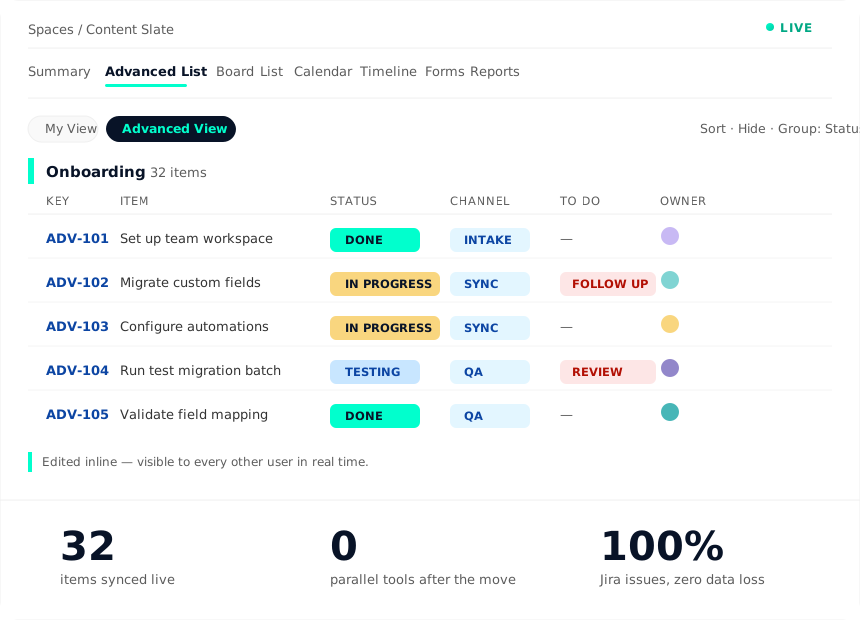
IT wants to consolidate. The business wants to keep its Monday board. Advanced List settles the argument: a Forge app inside Jira that recreates the Monday.com board – inline editing, custom columns, groups, live updates. One data model, two ways of working.
The dilemma
Both sides are right. That is exactly the problem.
Monday replacements rarely fail on technology – they fail on adoption.
"We see everything on one sheet."
Hundreds of rows, custom columns, colours that carry meaning, editing right in the cell. In plain Jira that is one click per issue.
"One tool, one governance."
Two systems means double licences, double permission models, no shared reporting – and compliance questions in two places.
Jira underneath, Monday on top.
Advanced List renders the familiar board inside Jira. The data are Jira issues – the way of working stays Monday.
Advanced List · Forge app, hosted inside Jira
The Monday experience, built on Jira data.
No third-party server, no copied data: Forge runs in the Atlassian cloud, your content stays in your instance.
Inline editing
Change values right in the cell – status, channel, to-do, custom fields. No opening the issue, no save dialog.
Custom columns & groups
Any grouping, any column order, any colour logic – configurable per team and saved as a view.
Live updates
Changes appear in real time for every other user – no refresh, no edit collisions.
Views per role
"My View" for the individual, "Monday.com View" for the team – same issues, different lens.
Filter, sort, search
Full-text search and person filters across hundreds of items – groups stay intact while you filter.
The rest of Jira included
Board, calendar, timeline, forms, reports, automation – Advanced List is a tab, not an island.
The migration
Five steps – with a real test migration in every one of them.
As in every XALT migration, we test with real data from day one – not at the end.
Board analysis
Inventory every Monday board: columns, automations, formulas, links, and who actually works in it. Output: field mapping and a fixed price.
Jira model & Advanced List view
Set up project, issue types and fields – and configure the Monday.com view so your team recognises its board on sight.
Test migrations with real boards
Run 1 the project team, run 2 the critical boards, run 3 the key users – each run sharpens the runbook.
Production migration
Items, comments, files, owners and history – plus an explicit list of what deliberately stays behind.
Enablement & Monday shutdown
A short session on Advanced List, then 30 days of hypercare – the Monday licence goes away after that, not before.
Bring your busiest board.
We rebuild it as an Advanced List view in Jira – with your columns, your colours, your data. You decide afterwards whether to migrate.