Shared mailboxes & helpdesk
Managing shared mailboxes professionally with Jira Service Management
Turn support@, info@ or complaints@ into a structured helpdesk process.
Shared mailboxes quickly become difficult to oversee as teams and request volumes grow. Jira Service Management turns the flood of email into tickets, queues and SLAs – on a platform your team already knows.
According to Forrester
According to Forrester, companies lose up to 25 % of their efficiency to fragmented systems like these.
The challenge
What changes once the mailbox becomes a ticket
Without Jira Service Management
Overview
Handling
Communication
SLAs
Reporting
License costs
With Jira Service Management
Overview
Handling
Communication
SLAs
Reporting
License costs
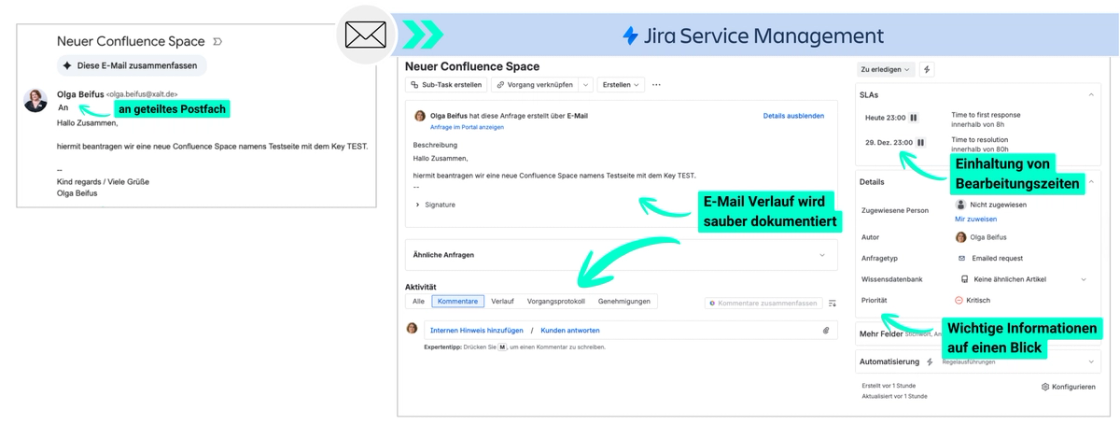
How it works
Every incoming email becomes a ticket with a clear owner
For senders, almost nothing changes; they keep writing to the same address. In the background, something decisive happens: every incoming email automatically creates a ticket in Jira Service Management. Your team no longer works in the inbox, but in structured queues with clear ownership, configurable workflows and a complete communication history.
- Automatic ticket creation from every incoming email
- Structured queues instead of inbox chaos
- Configurable workflows from new to done
- SLA management with automatic escalations
- Transparent internal and external communication in the ticket
- One-click reporting: handling time, first response, SLA rate
The result: an uncontrolled team mailbox becomes a measurable, scalable helpdesk process on a platform your team already knows.
Your benefit
What actually changes for your team
Less operational effort
No more manual coordination: incoming requests are automatically captured as tickets and routed into a clear process.
Measurable service quality
Queues, statuses and owners make it clear who is handling each request and what happens next.
Cost savings
SLA compliance, first response time and workload are available at any time for management and reporting.
Scalability
Additional departments and addresses can be connected using the same ticket, queue and SLA structure.
Extension stage
How Rovo creates additional value
Jira Service Management gives your team structure. Rovo, Atlassian's AI, makes processing faster: incoming emails are categorised automatically, urgent requests reach the right people directly, and frequent questions can be answered before your team opens the inbox. Rovo can also draft replies from Confluence, past tickets and knowledge articles, and flag potential SLA risks.
- AI-assisted categorization and prioritization of requests
- Intelligent routing to the right queue
- Suggested replies based on Confluence and past tickets
- SLA risk detection for critical tickets
Rovo is ideal as a second phase. First, the shared mailbox is cleanly converted into tickets, queues, SLAs and reporting – then Rovo helps shorten response times and further relieve your team. A further phase is a customer portal with self-service and a virtual agent that can answer requests before a ticket is created.
Rovo in detail
What Rovo actually does for your team
AI-assisted categorisation and prioritisation
Rovo automatically sets request types, priority and labels. This reduces manual triage and makes urgent requests visible faster.
Intelligent routing
Tickets reach the right queue faster. Less waiting time for new requests, less manual redistribution.
Suggested replies for agents
Rovo can draw on relevant information from Confluence, past tickets and knowledge articles to draft replies. Your team responds faster and more consistently.
SLA risk detection
Rovo can flag which tickets might become critical based on content, age or complexity. Teams can react proactively instead of only at escalation.
Reporting summaries and trend detection
From dashboard data, ticket volume and recurring topics, clear management summaries can emerge, e.g. on rising complaint causes, seasonal peaks or recurring process issues.
Outlook
Further stages
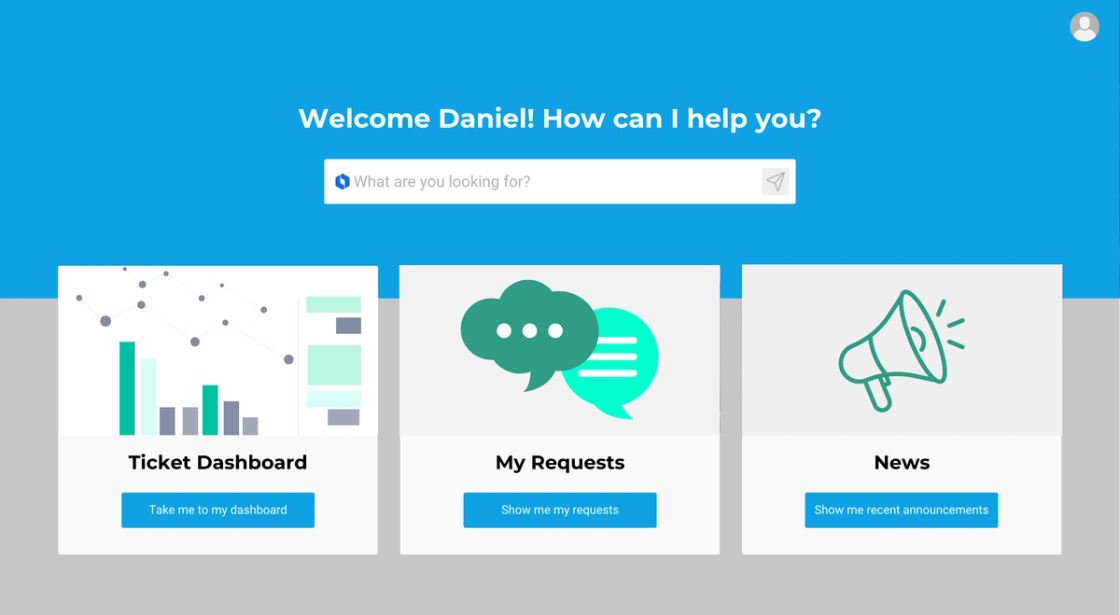
Rovo works best as a second stage. First the shared mailbox moves cleanly into tickets, queues, SLAs and reporting—then Rovo helps you shorten response times and take more load off your team.
A further stage would be a customer portal with self-service, where a virtual agent answers requests before a ticket is even created. That cuts request volume and takes pressure off teams, above all on recurring standard topics.
Technical framework
Runs on what you already have
In detail
What the implementation actually looks like
Automatic ticket creation from emails
Every incoming email instantly becomes a Jira Service Management ticket, with a reporter and participants
Structured queues instead of an inbox
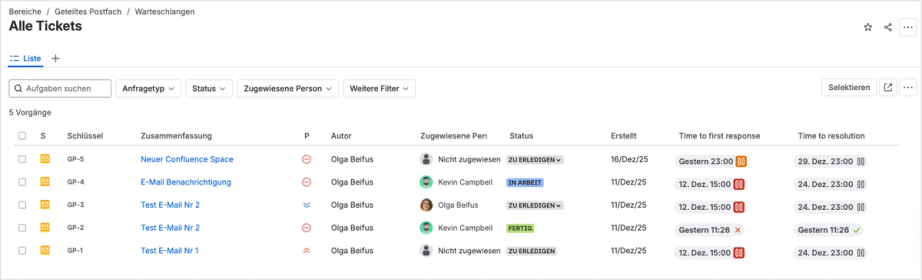
Every open request with its status, priority and owner at a glance
Binding response times per team
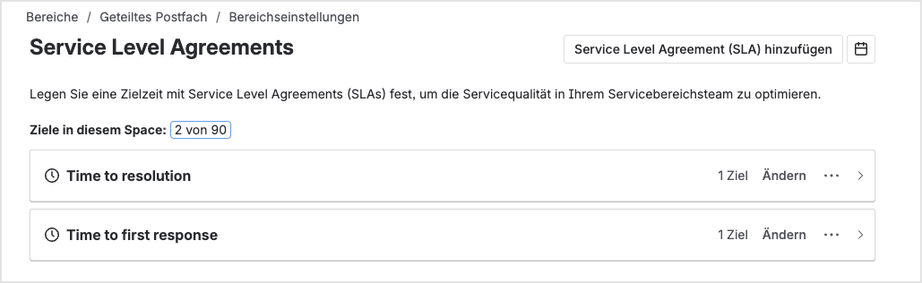
SLAs for time to first response and time to resolution can be set individually per service area. If exceeded, the system escalates automatically, no manual follow-up needed.
Configurable workflows
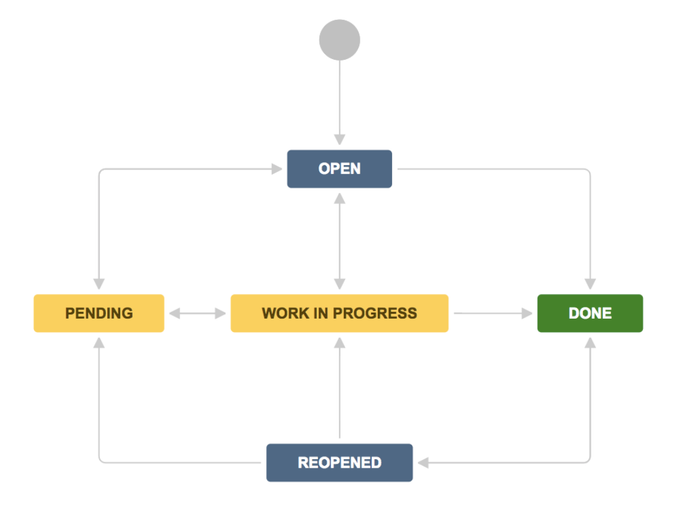
Every ticket runs through a configurable status workflow: from "open" through "pending" and "work in progress" to "done" – including a defined path back to "reopened".
Internal coordination, invisible to customers
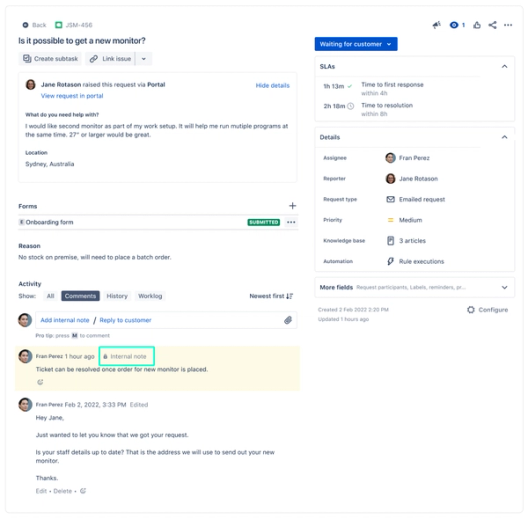
Internal comments allow questions and coordination within the team, directly on the ticket, without senders seeing any of it. Everything stays documented in one place.
Metrics at the push of a button
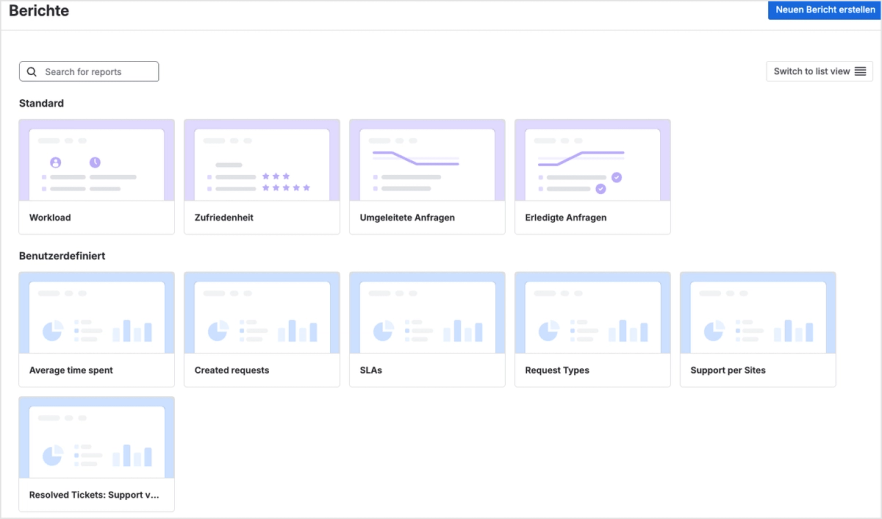
Standard reports on workload, satisfaction, redirected and completed requests, plus custom views, give you the current state at any time.
FAQ
Frequently asked questions
In a classic mailbox, not at all – there is no binding assignment. With Jira Service Management, every incoming email automatically gets a ticket with a fixed owner. Responsibilities are governed by queues and workflows; nobody can miss a request or work on it twice.
The most common alternative is Jira Service Management: the mailbox remains as an entry channel, but processing happens in structured tickets, queues and workflows – without a new software license if JSM is already in use.
Yes. JSM shows every team member the same status in real time. Each ticket has one owner and a clearly visible status. Duplicate work and forgotten requests are structurally prevented.
There are two variants: direct connection (JSM connects directly to the mailbox) or forwarding (the mailbox forwards emails to JSM). Which variant fits depends on security requirements and IT infrastructure.
In JSM, SLAs, reminders and escalation rules can be fully configured for first response time, resolution time and individual process steps. If exceeded, the system escalates automatically.
If JSM is already in use, no additional license costs arise. On the contrary: replacing separate Microsoft mailbox licenses actively lowers costs. Implementation effort depends on complexity and the number of mailboxes.
JSM offers a real-time dashboard with all open requests, their status, the responsible person and the remaining time until SLA expiry. No more manual follow-up; the status is visible at a glance at any time.
JSM takes over the entire handling process: intake, assignment, workflow, communication, SLA tracking and reporting. The mailbox remains as the entry channel; processing happens entirely within JSM.
Yes. Every incoming email automatically creates a ticket: the subject becomes the ticket title, the content becomes the description. Filters can keep out unwanted senders or spam.
Through JSM's ticket structure: every ticket has exactly one owner. As soon as someone takes on a request, this is visible to the whole team. Queues only show unhandled or explicitly assigned requests.
Yes. Senders receive automatic status updates by email and can track their request via the self-service portal, if available – without a call or query to the team.
Yes. Senders keep writing to the same address. The connection runs entirely in the background; nothing changes for outsiders.
With direct connection, CC recipients are automatically recognised as request participants and receive status updates. With the forwarding variant, an automation reads the CC addresses and adds them as participants.
Yes. JSM supports direct connection to Microsoft Exchange and Office 365 shared mailboxes as well as classic email forwarding – without an additional Microsoft license.
AKDB – an IT service provider for around 5,000 Bavarian municipalities – has been using JSM in production since 2023, including replacing shared mailboxes.
Next step
Ready to bring your team mailbox under control?
We'll show you what the integration could look like for your organization – in a personal demo or a no-obligation initial conversation.